


You can barely walk a minute in Google Ads without seeing the suggestions in front of you.
The overview screen displays them in a highly visible box.
The notification bell will turn red to remind you that several suggestions are waiting.
The suggested budget increase appears next to the graph at the top of the “Campaigns” section.
You can click a button to apply the updated amount and spend more instantly.
-
Screenshot of Google Ads, January 2022
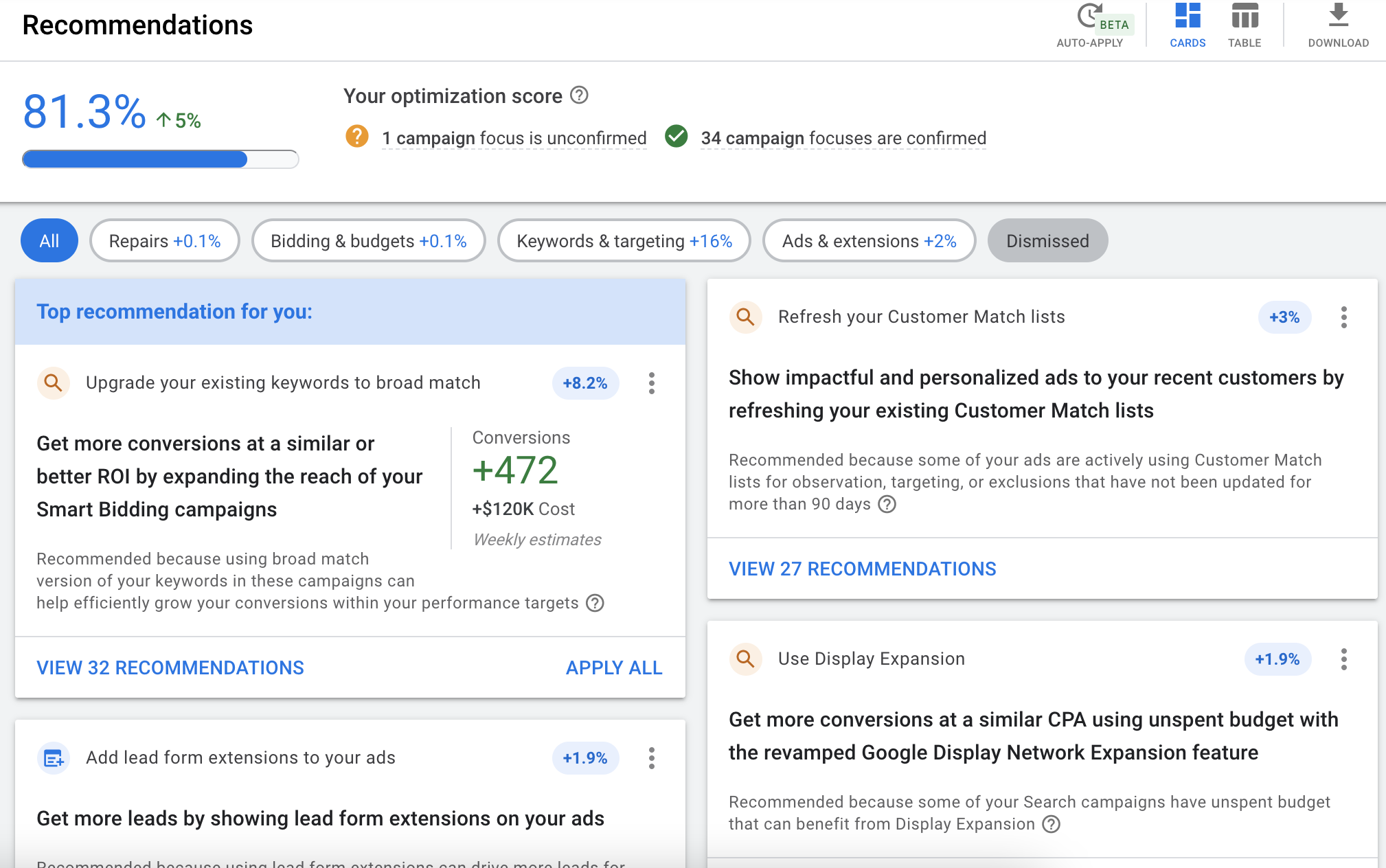
So how helpful are these tips from Google for advertisers?
Let’s take a deeper look at the types of recommendations and how well they relate to metrics that are important to performance.
Overview of Recommendations
First, what is Google’s proposition about the value of recommendations? Official support page Say:
“Recommendations can introduce you to new, relevant features that help you get more out of your budget by improving bids, keywords, and ads, and help improve overall campaign performance and efficiency.”
If you work with an official Google representative, they spend a lot of time talking about optimization scores.
In Google’s eyes, this score measures how well your account follows best setup practices.
In general, suggestions are directly related to optimization scores, and Google will give you an exact percentage that each suggestion you accept will increase your score.
Types recommended by Google Ads
While the specific suggestions that appear vary by account and the type of activity being run, there are several common types of suggestions that tend to appear.
Let’s consider some common ones here.
1. Budget
When a campaign is limited by budget, Google typically recommends increasing the daily budget cap to ensure ads are shown throughout the day.
The danger with this advice is that with a single click, you can significantly increase your budget.
For example, one of the accounts suggests that you increase your campaign budget of $75/day to $690/day.
This would increase the monthly spend for that single campaign from $2,250 to $20,700.
Whether managing accounts for clients or for their own business, most PPC managers have some level of budget constraints and can’t arbitrarily increase their budget significantly without approval from their superiors.
Increasing your budget suggestion can help reveal the fact that your campaign has limited reach.
It can help you gradually increase your budget (if the performance is good). But immediate, exponential budget increases are unlikely to be the ideal path for most clients.
2. Conflicting negative keywords
This advice is what I usually find useful.
If you accidentally add any negative keywords This will prevent the current keyword from appearing, Google will warn you and allow you to delete conflicting negatives with one click.
Also, if you want to exclude certain terms but forget to pause keywords that contain those terms, this can also help flag keywords that you don’t intend to activate.
You should still take the time to double-check the conflict list before applying it automatically.
3. New keywords
Google regularly adds new keyword ideas to your campaigns.
You should always go through these lists and not just blindly click and add them.
I’ve found that keyword ideas can range from a handful of relevant queries to extremely broad and irrelevant keyword topics.
For example, a Google Ads campaign promoting accounting services saw phrases like “how to find an employer identification number” being recommended for bids.
4. Add extensions
Google will often suggest adding extensions that don’t work with your account.
Some extensions are generally suitable for full-scale applications, such as Sitelinks and Callouts.
However, not all extensions may be relevant to every company.
For example, a SaaS product might prefer to send people information through a sign-up process on a landing page rather than paying for a click to call.
Even if you can’t necessarily figure out a way to incorporate an ad extension right away, stay creative with potential options that can help increase your ad’s visibility.
For example, a plumbing company’s app as an image extension might not immediately come to mind, but incorporating vehicle images or even photos of workers can help visually draw attention to search ads.
5. Add audience segments
These recommendations are another area I find useful at times, as the data is often based on actual audiences who are currently engaging with ads and visiting your website.
However, you should still take the time to review the options carefully before applying everything, as not all audiences may be relevant to your brand.
6. Include search partners
Search for a partner Depending on the client, performance can suffer, and sometimes the quality of leads can be reduced even when the CPA is efficient.
If you’ve excluded search partners for lead-related or budgetary reasons, you can ignore this suggestion.
7. Improve Responsive Search Ads
The suggestion will surface to suggest adding more title/description or more customized copy that is closer to the keyword.
This area is also a complex one, as RSA’s ad strength metrics don’t necessarily correlate with good conversions.
However, a study by Optmyzr showed that Ad strength can be correlated with capturing more usable impressions, so considering these suggestions may help improve overall coverage.
Thoughts on Proposal
Let’s go back to the question in the title of the article.
How much can you trust recommendations in Google Ads?
First, the recommendations are clearly related to Google’s perception of best practices, which may not be related to the actual approach to your account’s end goals.
For example, the ultimate goal of a business using Google Ads might be to provide qualified leads that convert into sales, sell e-commerce products through their website, or get users to buy an app.
Recommendations that increase conversions but only result in lower quality leads may not be helpful.
It’s best to test bid strategy adjustments in an experiment campaign rather than switch strategies right away.
For example, you can allocate 50% of your traffic to campaigns using Target CPA bidding, and 50% of your traffic to original CPC manual campaigns.
Next, depending on your business, some suggestions may be more or less relevant to you.
Carefully consider the implications of applying each, and the potential for helping or harming your account.
Adding broad match keywords may not help when you’re already limited by your budget for exact and phrase match keywords, but if you have the budget, you may find that broad match helps uncover new queries.
In short, Google’s recommendations can provide some useful guidance and shouldn’t be ignored entirely without scrutiny.
But don’t rely on them as the ultimate tool to optimize your account.
More resources:
Featured Image: fizkes/Shutterstock


