


Disclosure: This content is supported by readers, which means that if you click some of our links, we may receive commissions.
LinkedIn is the world’s largest professional network with 756 million members In more than 200 countries. So, of course, this is the main place to find talent.
However, senior job listings on LinkedIn can be expensive. There are many companies and recruiters on LinkedIn competing for top candidates.
Don’t worry, we provide some solutions and useful tips to ensure you get the best talent without spending money.
Why it is worthwhile to use LinkedIn for hiring
You can use multiple channels for recruitment. So, why should LinkedIn be prioritized?
Wide-ranging influence
LinkedIn has become the main online channel for professionals from all walks of life. Job seekers will definitely use this channel to find new opportunities and share their latest information. This means a lot of talent at your fingertips.
Recruit passive candidates
LinkedIn provides you with the opportunity to reach the best people, even if they are not actively looking for work. These passive candidates may be open to new opportunities, but are not active on the working committee. Using LinkedIn’s advanced search tools, you can find candidates with the exact experience and qualifications you are looking for and let them know you are looking.
Know your target candidate
LinkedIn provides ample opportunities for personalization. All you need to do is check the candidate’s LinkedIn profile to understand what is driving them. As a recruiter, you can use this information when organizing job descriptions and contacting candidates.
Show your company
Recruitment is not just a group of candidates scrambling to find a job. It goes both ways-you also have to make the company attractive to potential employees.
Your company page allows you to share your people, culture, industry views, etc. in a way that attracts the candidates you want to target. Where better than social networks can attract people’s attention and attract potential candidates who may not know the company.
The investment required for hiring with LinkedIn
The level of investment here depends on your requirements.
First you were able Post jobs on LinkedIn for free. However, this option is limited. You can only list one job at a time, and its visibility will decrease over time. If you are a large company looking for multiple candidates at the same time, this is not good.
The list of promoted positions brings more benefits. For example, they first appear in job recommendations, and LinkedIn will automatically send notifications to qualified candidates.
You will pay for the promotion position at a cost-per-click. But you can set a daily spending limit based on your budget.
Since prices fluctuate every day, it is difficult to accurately determine the cost per click.But when you consider this The average cost of a LinkedIn ad click is $5.26, Posting jobs on LinkedIn can become relatively expensive.
However, do not cancel your LinkedIn job position for the time being.You may get better deals by using Applicant tracking software Cooperate with LinkedIn.
When you register Fresh teamFor example, you can publish multiple limited job listings on LinkedIn and other major work platforms for free. These job postings will be available through searches and links on your company’s LinkedIn page.
The platform also provides job description templates to help you get started, and you can publish posts to different sections with one click. In addition, you will be able to manage applicants from various channels in one place, collaborate with your team, and create custom workflows for the recruitment process.
7 steps to recruiting with LinkedIn
Here, we will describe how to post a job on LinkedIn and the steps you should take before and after creating a list. In addition, there are plenty of suggestions on how to successfully use LinkedIn as a recruitment tool.
Step 1-Enhance your company page
It pays to have a good foundation before posting a job on LinkedIn. When candidates see your work, they may visit your company page to do some research. So you need to make a deep first impression.
Fill in as much information as possible so that candidates can easily understand all the information they need to know about the company. Include useful links, company descriptions, product details, location, and specialty.
These are just the basics. You should also use your company page to attract candidates.
Use eye-catching pictures, perhaps even behind-the-scenes pictures, to showcase the company’s culture and help candidates imagine where they can adapt. This is the company page from eBay, for example:
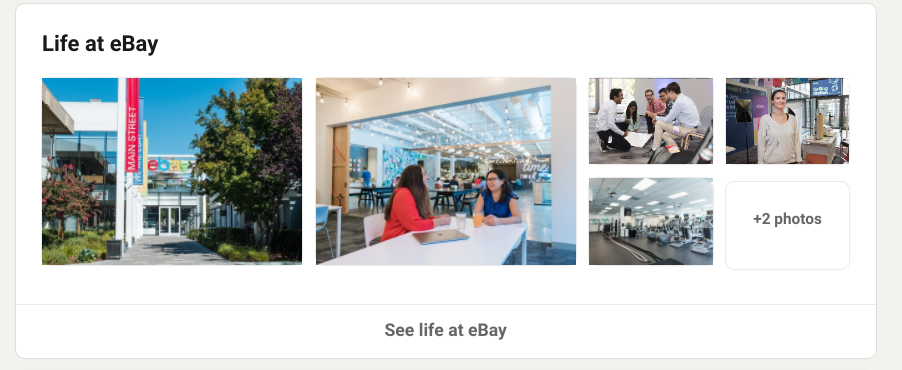
Ensure that any copy reflects your brand personality, achievements, mission and values. Show that your company is not an unnamed entity-it is a good place to work.

Here, eBay talked about its mission to help every individual, entrepreneur and small business succeed. This is an attractive mission statement. So you can imagine that other people will want to be part of promoting it.
Step 2-Write a compelling job description
Just like your company page, your job description is another asset you use to attract candidates. A good job description will do some pre-screening work for you.
You will always have unqualified candidates applying for positions. However, I hope that the job description is clear enough in its responsibilities and requirements, and those who are not suitable for the job or vice versa will not apply. This will save you the time you would have spent sorting wheat from the chaff.
The easiest and fastest way to put job descriptions together is to use templates. Maybe your HR team has internal templates for different categories or roles.
Or, there are hundreds of Freshteam Unique job description template Suitable for various roles in various industries.
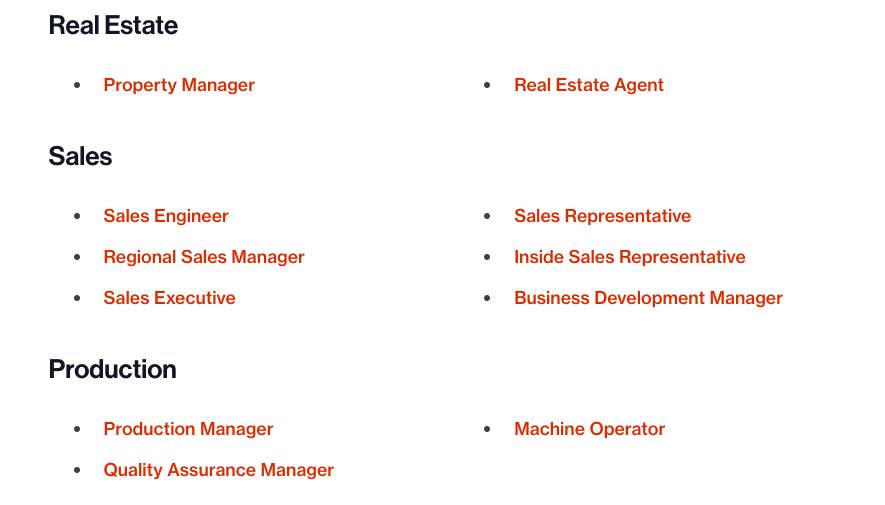
If you are starting from scratch, be sure to include the job summary, role responsibilities, and candidate requirements.
To make your job description more compelling, please add a section stating what the candidate can get from the job. This outlines the main benefits of accepting the job, such as learning and promotion opportunities. You may even want to add a section that outlines the candidate’s career development, which is important for many applicants.
Step 3-Post your job on LinkedIn
If you decide to use recruitment software, you will be able to post jobs directly from within the platform to multiple sections and channels, including LinkedIn.
If not, here is how to manually post a job on LinkedIn:
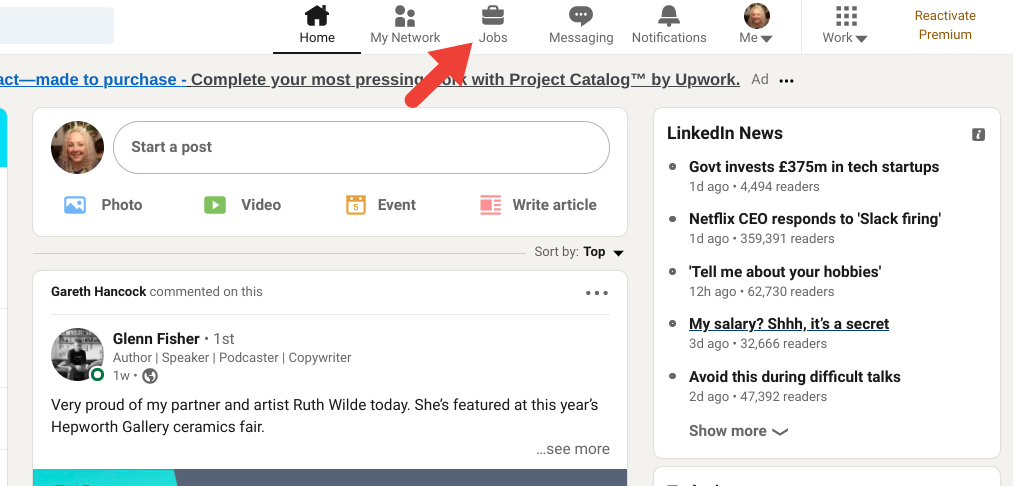
Click on Work icon In the menu bar.
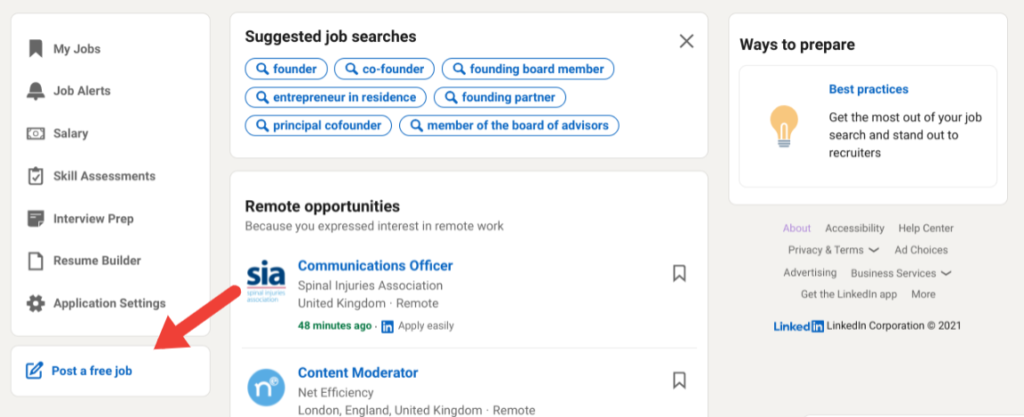
Click on Post a free job button In the left menu.
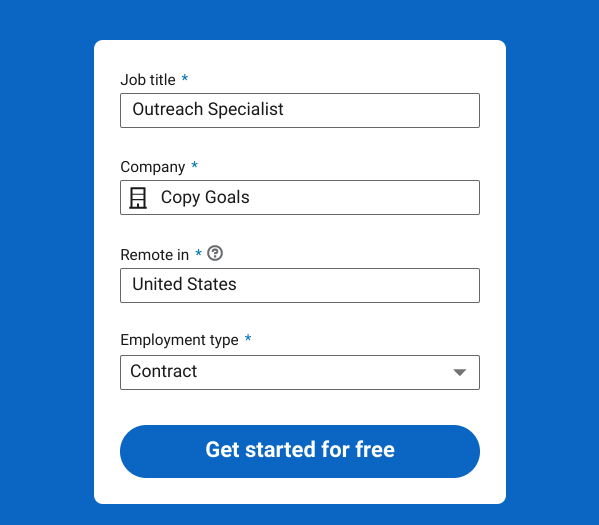
Fill in the job title, company, job location and type of employment.then click Start for free.
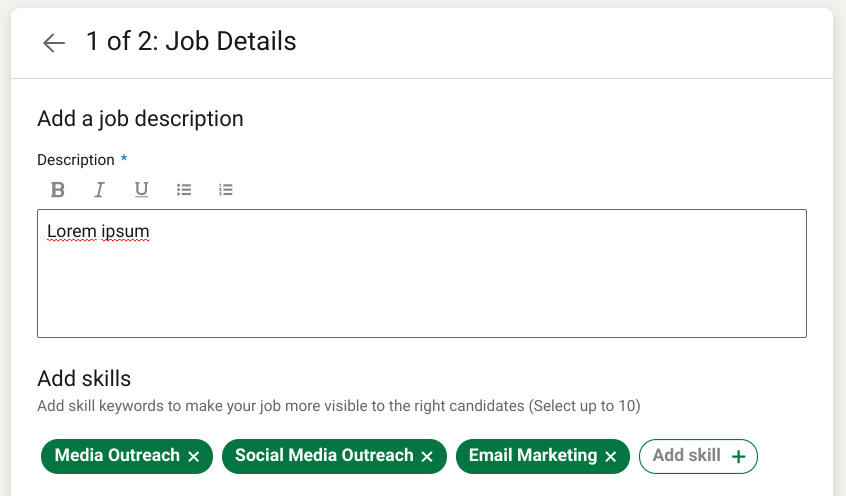
Copy and paste your job description into the relevant box, then add up to ten required skills.
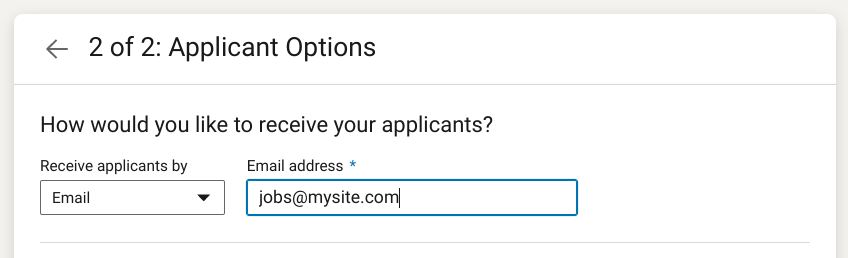
Choose how you want to receive applicants via email or external website link. For example, the latter might be a link to a Google form or your career page.
When you select email, you can add filtering questions for applicants. LinkedIn will make some suggestions, and you can add your own suggestions.
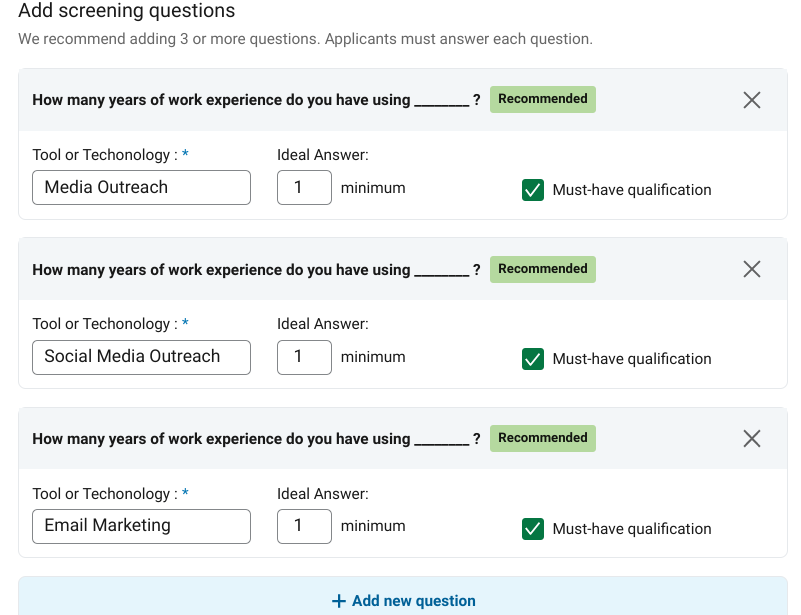
You can choose to automatically reject candidates who do not meet your pre-screening requirements. These candidates will receive an email regarding the status of their application.
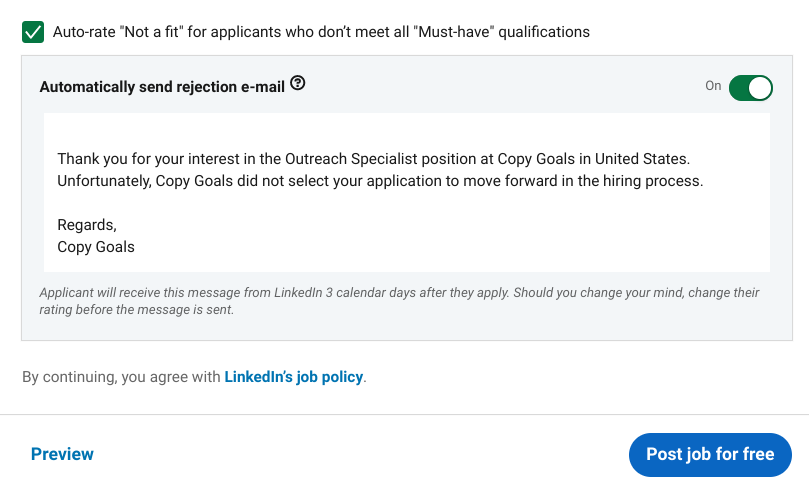
Click on Post jobs for free Make your job posting.
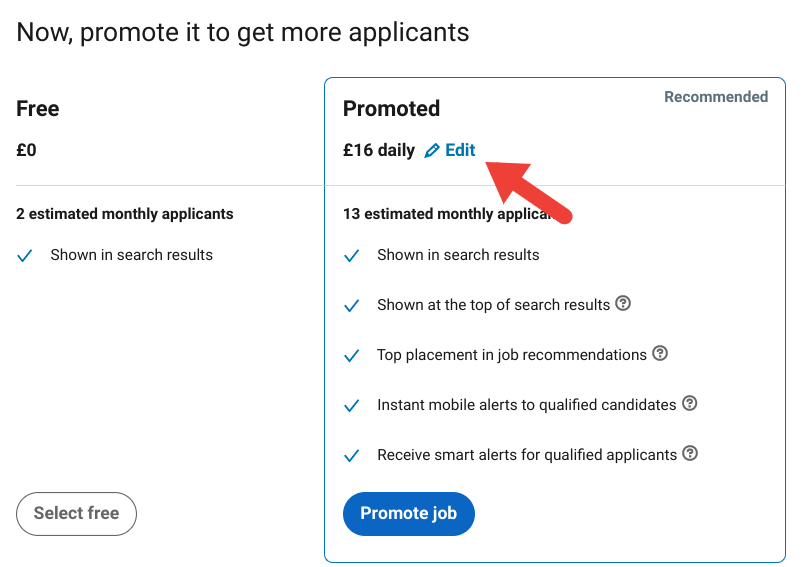
Next, you can choose to promote your position.Click on edit Set your daily or total spending limit at the top.Click on Promotion job continue.
If you don’t want to promote your work, please click Continue Choose free.
Step 4-Share your job title
Whether you are creating a free job or a promotion, it is always a good idea to share it with your network. This will maximize the scope and visibility of your job postings.
The first position of the shared job posting is your company’s feed. Then, when your followers visit LinkedIn, it will show up in the main feed of your followers. This is a good idea, because by following you, they have already shown interest in your company. Therefore, there may be potential candidates in the mix.
In addition, share the job posting on your personal LinkedIn feed and encourage other employees to do the same. You will reach out to more relevant candidates in their network.
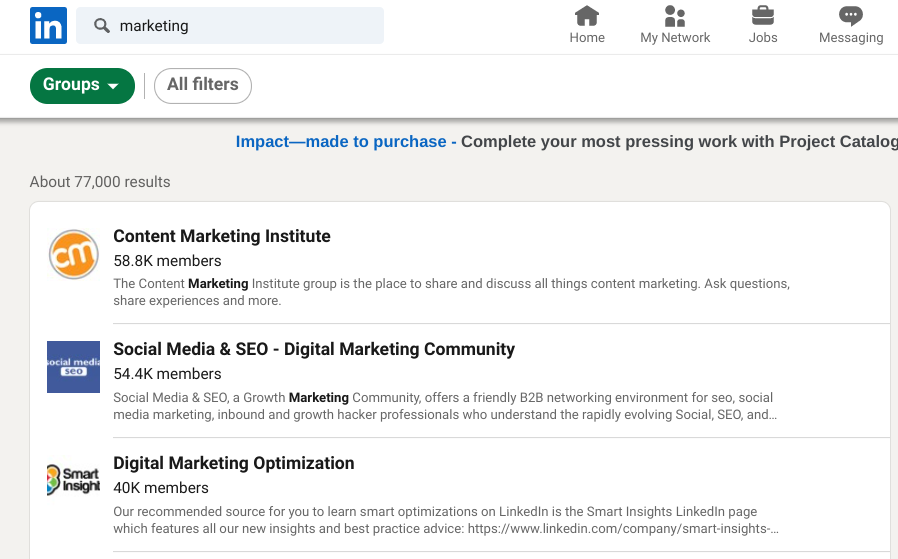
Next, you should share your job position in the relevant LinkedIn group. To find the most suitable group, just enter keywords related to the position or your industry in the search bar.Then choose Group tab At the top.
It’s best to post in a group you are already actively participating in. In this way, your post will not appear junk.
Step 5-Consider upgrading
Maybe you want to pick some strong candidates or attract the interest of passive candidates. The best way to do this is to contact the individual directly.
Admittedly, it is difficult to find and contact LinkedIn members with a free account. But this is not impossible.
With a free account, you can only search 3 times a week, and only send InMail messages to members you associate. Therefore, if you see a promising candidate, you must first establish a connection before sharing the vacant position.
However, the premium account allows you to perform unlimited advanced searches, browse unlimited accounts, and send a certain number of InMails to unreached people every month.
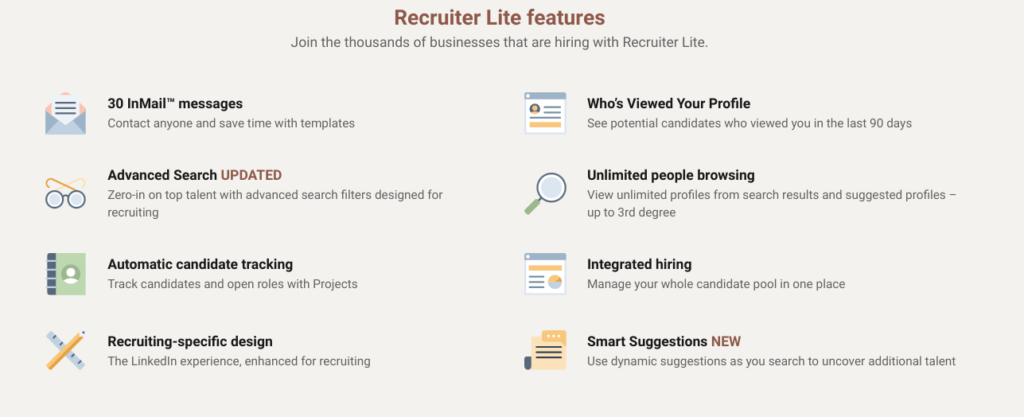
Therefore, you may wish to upgrade to a premium account, such as Recruiter Lite.
However, premium members who charge $99.95 per year are not cheap. So you have to figure out whether your return on investment is worth it.
Step 6-Send a personalized message
If you decide to use InMail to contact potential candidates, simply “Are you looking for new opportunities?” will not cut it. This is especially true for passive candidates.
If they know nothing about your company or receive a lot of similar copy and paste jobs, they will ignore the message.
Therefore, you need to personalize to ensure that your information stands out. There are several ways to solve this problem.
Check the candidate’s LinkedIn page carefully to determine their interests and values. Take advantage of these by explaining how open positions reflect what they care about.
Or, you can mention their experiences and achievements and explain why they stand out as a candidate in your eyes. We all like flattery!
You can even start with a soft connection. Send them a message about what they posted, and then continue the conversation from there.
Step 7-Monitor your job postings
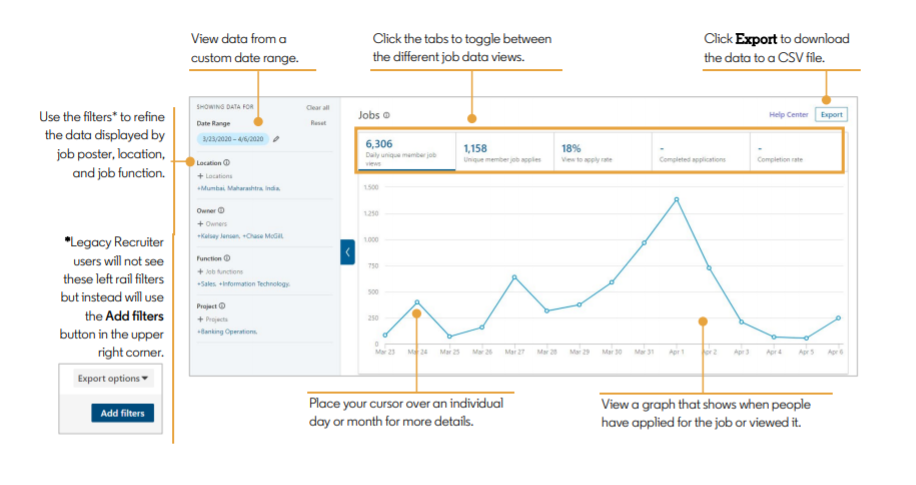
You can learn a lot by monitoring the performance of job postings. For example, if your position does not receive the attention you expected, there may be room for improvement. Or, you can figure out whether LinkedIn is an effective recruitment tool for you.
LinkedIn provided a series of data in the report. This includes the number of job views, number of applications, view application rates, and demographic information about candidates.
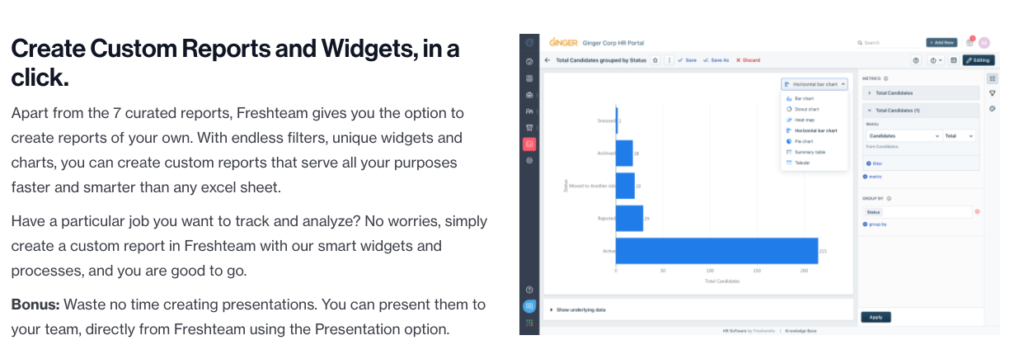
Or, if you use applicant tracking software such as Freshteam, you will be able to access extensive reports from multiple recruitment channels. For example, you can learn where candidates find you to determine the best recruitment channel. Or track the status of applicants to ensure that the recruitment process is organized and that no one will fail.
Next step
As mentioned earlier, a great job description will help you attract the best candidates.If you are hiring a salesperson, please check our guide Write a sales job descriptionIt also includes a long-term strategy to attract top talent.
Already found a good candidate? The next step is to guide them effectively. You should not ignore this process, because a positive onboarding experience will encourage new employees to stay.If you want to improve and simplify the onboarding process, you should check our guide The best starter software.


