


Google Analytics has long been the gold standard for tracking website performance because most, if not all, channels return to your website, which means it’s used to track the performance of all your marketing.
On March 16, Google announced that one of its most common instances of Google Analytics (General Analytics) would be gone.In this article, we will introduce
- What changed, why and when
- How to tell if your account will be affected
- what do you need to do
what has changed
- Simple version: Universal Analytics will be replaced by Google Analytics 4 starting July 1, 2023.
- Official Announcement: Google Announce “As of July 1, 2023, standard Universal Analytics properties will no longer process data. “You will be able to see your Universal Analytics reports for a period of time after July 1, 2023. However, new data will only flow into your GA 4 property. “
Let’s break it down:
What is property?
This is the website or application that you track with Google Analytics. If you are currently using Universal Analytics to track your website, this will be referred to as your “Universal Analytics Asset”. Once GA4 is set up, you will have a “Google Analytics 4 Property” for the site. Since UA and GA4 are different, you can provide different reports for each attribute.Learn more about Google Analytics properties are here
What is Google Analytics 4?
To understand exactly what GA4 is, take a little Google Analytics History Lessons are ordered.
- Google Analytics: The first instance of Google Analytics came out in 2005 (when you had a Razr flip phone with your favorite song as a ringtone).
- Universal Analysis (UA): The new and improved Google Analytics introduced in 2012 became the default property type.
- Google Analytics 360: This is a software suite that provides Tag Manager, Optimization, Insights, Surveys, Attribution and Audience Center in addition to Universal Analytics. Introduced in 2016.
- Google Analytics 4: This is the latest version of Google Analytics, released on October 14, 2020.
What is the difference between UA and GA4?
Google Analytics 4 offers more than just Universal Analytics. It is built differently to accommodate current and future reporting and privacy needs. Below are some of the differences and benefits.
- Based on events: Universal Analytics is session based, while GA4 is event based. In other words, GA4 has built-in ability to track events like button clicks, video playback, etc., which requires advanced setup in UA. This is based on the premise that page views are not the only important metric.
- Track across devices: UA is built around desktop web traffic, and GA4 enables businesses to understand the customer journey across all their websites and applications.
- Machine Learning: GA4 uses machine learning techniques to share insights and make predictions.
- Privacy friendly: UA data relies heavily on cookies, which GA 4 does not.
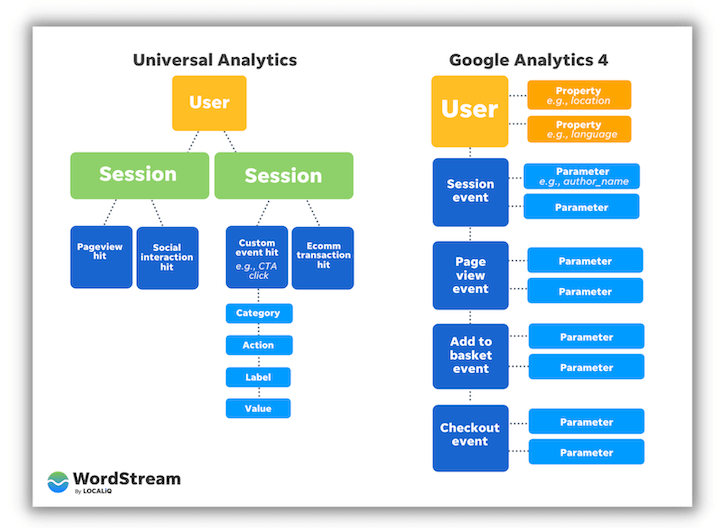
you can also read Google’s explanation of UA vs GA4 is here.
How do I know if I am using Universal Analytics?
Google Analytics 4 was released and made the default on October 14, 2020, so if you created your property after that date, you are most likely using GA4. If you were using analytics before that date, you’re probably using UA.
If you are not sure, you can Check your property type Click the down arrow next to the asset name in the upper left corner of your account:
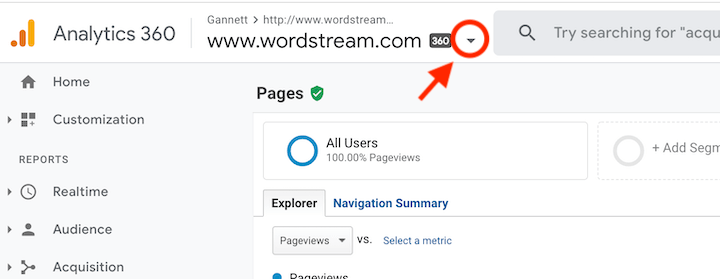
Then check your property ID:

- UA attribute IDs start with UA and end with a number.
- GA 4 attributes have numbers only.
what do I need to do?
1. Switch to GA 4 as soon as possible
While you still have over a year to make this change, it’s best to make the transition now so your GA4 account can gather the data needed for automated insights.
If you are currently using UA, you will need to set up a GA4 property next to the existing UA property.use Google’s GA4 Setup Assistantwhich gives you the option to use an existing tag for settings.

If you run Google Ads, have custom events, or use other advanced features, see Google’s page on how to switch to Google Analytics 4— Break down the process into 12 steps, each marked with a level of effort.
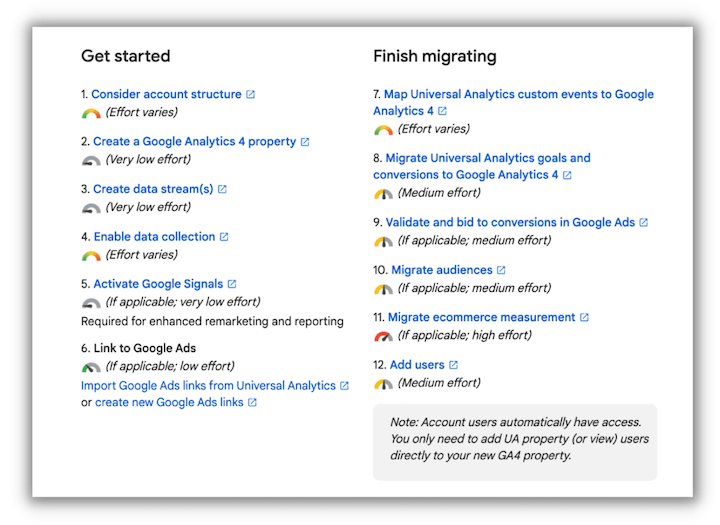
2. Adjust your Google Ads conversion tracking
Once your GA 4 property is set up, you can view Google Analytics data in your Google Ads account.
If you have conversion tracking set up, you should Import Google Analytics conversion data into Google Ads And remove any UA targets to avoid duplication.
To import your Google Analytics conversions, in your Google Ads account, go to Tools and Settings > Conversions > Add a new conversion action and select Import:
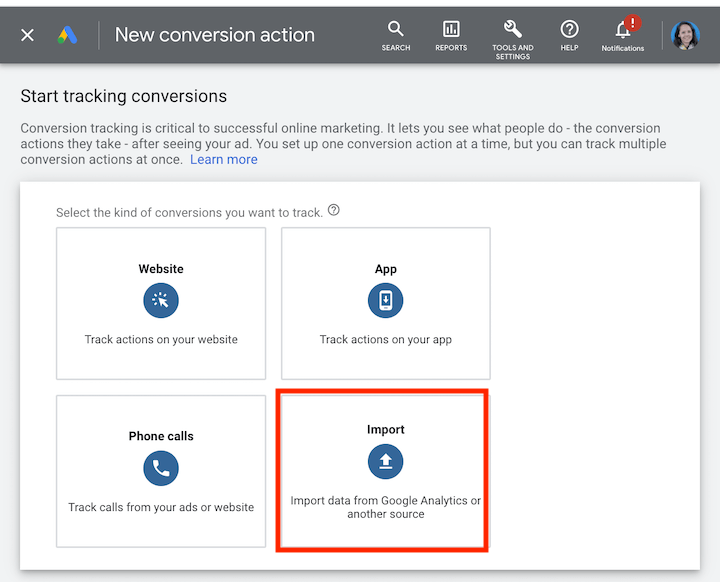
Here you can select each conversion event to import.
3. Export historical reports
Google will allow access to your Universal Analytics data for at least six months after July 1, 2023, during which time you should export data that is important to you. There are three export methods:
- You can export individual reports
- Using the Google Analytics Reporting API
- Export to BigQuery


