


Internal and external links play an important role in guiding website visitors to the answers they seek about your products and services.
Each link should lead your audience to where they need to continue gathering information and/or customer journey.
Links are the lifeblood of the web, connecting each piece of content to the next. Search engines use internal and external links to partially determine which pages are the most authoritative on any given topic.
Therefore, both internal and external links play an important role in SEO.
Why is internal linking important?
Google and other search engines use internal linking to better understand the structure of a website.
They enable website owners to let their visitors and search engines know which pages are the most important.
For example, top-level sections in site navigation (eg, Products, Services, About Us, Resources) tell search engines what the site owner considers the most important content.
Search engine spiders crawl various links within a site to determine their structure, and those pages closer to the top of the hierarchy are naturally considered more important.
After all, you don’t want to hide your most important content several layers deep in your website that are hard to find.
Always keep in mind that you are ultimately creating your website and all the content within it to provide accessible answers to your target audience’s questions.
Why are external links important?
Google and other search engines value links. If you link to an external website, search engines see this as an endorsement of the linked content.
External links can be used to cite sources, provide verification of information, and provide readers with further context.
Again, Google’s modus operandi is to deliver the right content to the right people at the right time. It doesn’t really care where the answer is, so sometimes it makes sense to link to the correct external content. You can’t expect to get all the answers.
For example, a good article published on a highly relevant and well-regarded industry website may be directly or indirectly related to the products or services your organization offers.
If the information in this article will benefit your audience by answering other questions they may have or giving you more insight into a topic, then you should certainly link to such articles.
Where, when and how should the link be added?
When you’re considering adding links to new or existing website content, put yourself in your audience’s shoes. It might be helpful to think about how they will be involved and a link.
If you haven’t already, take a step back and plan your typical customer journey. This will help guide what content and/or types of content you control should link to other content, from awareness consideration to intent to conversion.
Don’t be afraid to include a clear call to action (CTA). These are helpful for customers who are ready to click through to the next logical step in their journey and/or who are not ready and may need additional information.
Today, most customer journeys are not linear. It’s important to offer options based on where your customers find themselves when searching for answers, products, or services, and you can do this with links.
Do you have topical keywords and/or concepts in your new or existing content that require elaboration or questions?
Do you have other content to answer these questions (for example, in a blog post or FAQ), or do you know where the answers are? Can you do some research to find it?
By linking to content that provides relevant answers to these questions via actual keywords (also known as anchor text), you give search engines an important signal to help tie the question and answer together.
Your most prominent links and calls to action can naturally be associated with buttons or images, such as banners, and strategically placed to better capture the attention of website visitors.
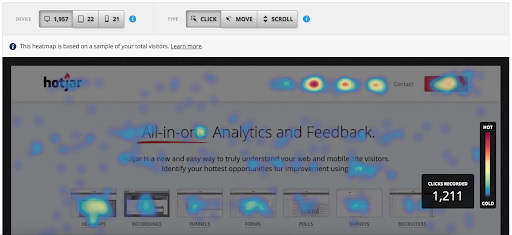
Visual UX analysis tools such as Click on the heatmap Can and should be used to monitor how visitors interact with your content and which links they are (or aren’t) clicking.
Additionally, tools such as the Path Analysis report in Google Analytics 4 can be used to Determine the path Any on-page action a website visitor takes from one page to another.
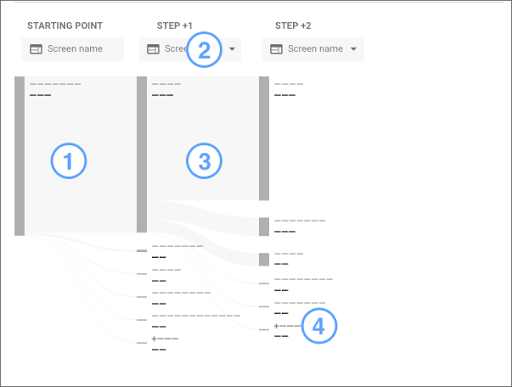 Screenshot by author, October 2021
Data from these tools can help inform and optimize your ongoing internal and external linking strategy.
Once you’ve decided where and when to add your link, there are a few things to consider when linking.
opens in new window/tab
When linking externally, you may want to open the link to the external web page/content in a new window or tab.
This way, when readers have finished reading “related” content, they can easily close the second window, navigate back to your original article, and continue their journey.
Internal links generally don’t need to open in a new window because you’re not directing readers away from your property.
However, in some cases this makes sense; for example, when linking to relevant help documentation on a software website.
Many times I click a link and be taken to an external website in the same browser/window, then click another link that takes me to a second external website.
Suddenly, I forgot where I started.
Yes, I can click the browser’s back button or view my browsing history. However, if the author doesn’t think the original article is important enough to me, I won’t go the extra mile to find the original article.
To follow or not to follow
As the site owner, you can choose to specify your Link as Follow or Nofollow by using
All other links default to follow.
Using Nofollow tells the search engines that support it not to assign any value to links related to pages that contain it. It literally means that you don’t want Google to follow the link and crawl the corresponding page.
It’s worth noting that Google has made it clear that they take this attribute as a suggestion rather than a directive.
Almost all internal links will be follow links, but in some cases you may choose to have Nofollow external links on your site.
There are also properties of links to paid, sponsored or user-generated content that you cannot confidently vouch for or control.
Look Should You Use Nofollow, Sponsored or UGC Links? Learn more about when to use each.
Add links, but don’t overdo it
While using internal and external links adds value to your audience and search engines, as with all SEO, it’s important not to overdo it.
In fact, Google recently stated that too many links On any given page it can actually have a detrimental effect, as it dilutes the value of those links.
Google uses links to understand the structure of a website, and if there are too many links, it can become a mess.
However, if you do a good job of reviewing the content and incorporating links to other relevant supplemental content, the logical structure should emerge.
If you look at your content and feel like there are too many links or links aren’t really adding value to your audience, please re-evaluate and edit with that in mind.
look back
Strategically adding and managing internal and external links remains an important SEO activity.
Links help guide Google, other search engines, and ultimately all site visitors, through the logical structure of a site, highlighting those that are deemed most important.
A good linking strategy will roughly follow the customer journey, answering a searcher’s question or elaborating on a topic with awareness content, converting through links and a clear call to action.
By always putting user experience first with links, you will naturally optimize for search as well.
Featured image: Paulo Bobita/Search Engine Magazine


