


With the onset of the COVID-19 pandemic, online ordering has become an essential feature of every web page and business listing.
Before the pandemic, the main goal of local search engine optimization (SEO) was to increase the visibility and foot traffic of a location.
Businesses are now focused on delivering a seamless omnichannel experience to allow customers to order online, either directly from a listing or at personal location page.
This also allows customers to choose how they want to receive their products, as well as the delivery or pickup option that best suits their needs.
With this shift comes strategies for maximizing the online ordering experience for brands.
In this post, we’ll share our local SEO ecommerce and online ordering guide to drive more conversions.
Maximize retail listings for online ordering
When looking for something to buy online, a customer may interact with a business listing as the first point of contact.
Setting up lists to guide customers to order online or visit your website is essential.
The order link should take the customer directly into the order process so they can start buying.
There should be as little friction as possible for them to start and place an order.
Direct your customers to menu pages, a breakdown of major categories, or a simplified search function.
In the list, you can also share available options for receiving your order, such as in-store pickup, curbside pickup, same-day or standard delivery.
These are called attributes, and each applicable retail attribute should be selected for each of your listings to provide searchers with as much information as possible.
new Google Properties Updates and additions are ongoing, so make sure you regularly monitor what’s available and applicable to your brand.
Local inventory ads for retailers
To minimize friction and improve the ranking of specific products, retailers should consider local inventory ads.
By setting up these types of ads for a brand’s location, customers can see specific products available at that location.
It also allows listings to rank specific products that customers are likely to search for on Google, and display what’s currently available at that location if they’re interested in picking it up.
This creates a simplified omnichannel experience for customers while encouraging faster conversions.
Here you can see an example local inventory ads in the Google Business Profile listing.
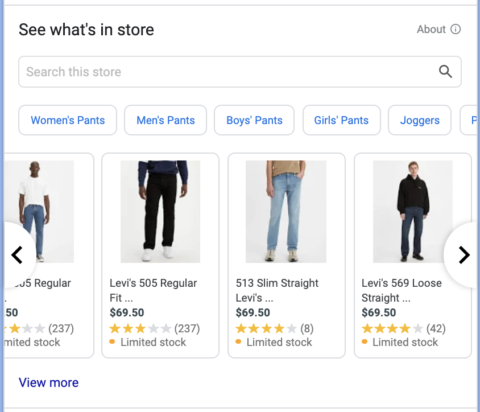
The list above shows the products in stock at the location and those related to customer search behavior.
When a customer clicks on one of the product ads, they’ll be directed to that retailer’s Google-hosted storefront.
Provided by Google necessary requirements Set up a local product feed to be able to take advantage of this feature in your listings.
Google provides metrics for brands to measure the performance of these digital ads.
This Basic Implementation Onboarding Details what is required to set up this setting for retailers.
Currently only available for physical stores in Australia, Austria, Brazil, Canada, Denmark, France, Germany, Ireland, Japan, Netherlands, New Zealand, Norway, Poland, Sweden, Switzerland, UK and US.
If you have implemented the basic setup for your local inventory product feed, there are several Optimization function.
These enhancements include Merchant-hosted local storefront, Show by orderand Pick up today feature.
To get started, you can contact your Google representative Local inventory ad support team.
restaurant online ordering
Setting the main category to a restaurant’s location can display online ordering directly on its listing.
This function can be directly in a Google Business Profile for Restaurant Locations By navigating to the food ordering options on the left panel.
To open it you would go Set up your “Order Online” button.
By updating the feature, your listing will show the option to order pickup or delivery, which will guide customers https://food.google.com/ for that single location.
The image below shows what this looks like in practice.
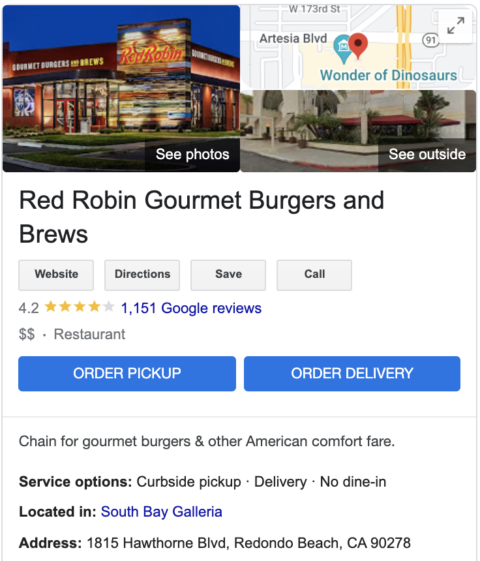 Image via Google Business Profile, February 2022
The user will then be presented with different options to order from the restaurant.
Customers can choose to order directly from the restaurant or choose a third party such as UberEats, DoorDash, Grubhub, Seamless, or any partner that works with the location.
For integrated locations, customers will be able to order directly within Google.
It will display the menu items available at that location along with a specific price.
It will also allow them to make any available modifications to their order.
When the order is ready to complete, customers will be able to check out directly within Google.
This convenience allows customers to stay on Google and use any saved credit card information they already have on Google.
This creates a seamless and streamlined ordering process, and checkout can be done in seconds.
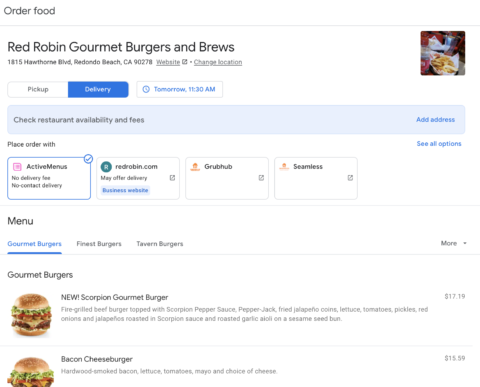 Image via Google Business Profile, February 2022
Use Google to set up an order for a restaurant
If a restaurant wants to be able to let customers order directly through Google, they need to follow a few steps.
restaurant to visit Order through Google’s help page See if they qualify for the service.
First, restaurants must work with approved third-party order suppliers such as Olo.
This is required because these third-party order platforms are integrated with Google.
Next, the brand needs to fill in a Interest Statement Start the process with Google.
Developers can view document to ensure they meet the necessary launch requirements.
there’s still one Launch Preparation Checklist Information provided by Google after your approval.
Maximize the location page for online ordering
Location pages should also be optimized for online ordering like location listings.
There should be a clear call to action (CTA) on the page to let customers know they can start placing an order.
It should highlight which options customers can choose to receive their products for pickup, curbside or delivery.
This page should clearly list any key information about the pickup or delivery procedure.
A great example is Target, which clearly describes all their options and then pushes customers directly into the order flow with a clear CTA.
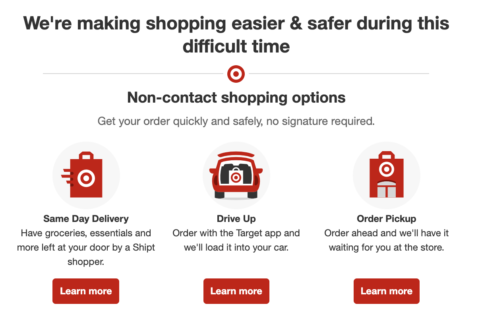 Image via Target, February 2022
in conclusion
Online ordering has become an important part of corporate strategy.
Regardless of your industry, make sure your listings and pages are optimized to create a Seamless omnichannel experience will help your brand drive more sales.
It also improves your user experience, encouraging customer loyalty and motivation mood.
More resources:
Featured image: elenabsl/Shutterstock


