


Post views: 10
In this modern era, everything happens on the Internet. People use online platforms to communicate with each other, merchants use emails to communicate with different companies and companies, and similarly, many websites and applications send a lot of emails to attract customers, but they are against the interests of ordinary people.Use the following method regarding your mail service provider, namely Gmail, Yahoo, Outlook, Apple Mail unsubscribe these unwanted emails,
Why unsubscribe unwanted emails?
In most cases, we receive a lot of emails that are meaningless and unnecessary to us every day. These emails are related to marketing, newsletters, promotional activities or business purposes. Because of these ridiculous emails, we sometimes miss personal emails. Therefore, we still don’t know the important emails.
Therefore, it is necessary to unsubscribe from these emails. Don’t panic every technical problem has a solution, and a method has been given! Therefore, it is necessary to unsubscribe from these emails.
Some ways to unsubscribe and read unwanted emails are as follows:
How to unsubscribe emails on Gmail?
If your registered website or application sends a lot of emails about its offers and updates every day, then you can get rid of this situation by following these steps:
There are two main methods for sending unwanted emails:
If you are a subscriber of a company or newsletter, you can unsubscribe via the link included in the email message. Sometimes Google will automatically generate an unsubscribe button in the upper right corner of the message if it finds the link separately.
If you receive an email without an unsubscribe link, please opt-out through the following methods:
- Go to your desktop
- Open the sender’s email
- Click on the three dots in the upper right corner
- Click Block sender and continue.
Then the sender will be transferred to If you blocked some important informational news sources and want to restore them, then you should repeat the above method at that time by the following methods spam Box. If you think the email you received should be in the spam section; also report it as spam or unsubscribe, Google will look at it and prevent the sender from accessing Gmail because it violates its community.
How to unsubscribe emails on Outlook?
Microsoft Outlook also has features that allow you to unsubscribe your inbox from spam and unwanted e-mails. Because Outlook provides its users with a limited space of 15GB to store their files and emails, but its space is often full of unexpected and unnecessary files, you cannot receive more emails from friends and family. But don’t worry, we also have a solution.
If you subscribe to company email: then you can unsubscribe through the following methods:
- Go to the desktop version of Outlook
- Go to settings
- Click More to view all Outlook settings for Outlook
- Click to subscribe now
- Here, all mail subscriptions will be shown to you, and you can unsubscribe
For mobile applications,
- Go to your Outlook app
- Open message
- Select the unsubscribe button
- Confirm unsubscribe
You can block email senders by entering their domain name or email address through the following process:
- Go to your desktop
- Open Outlook inbox
- Click the gear button next to your name in the upper right corner
- Choose more mail settings
- Keep safe and block the sender, under prevention spam
- Enter the sender’s email address or domain in the Blocked email address or domain box
For mobile applications,
- Go to your Outlook app
- Open message
- Select the unsubscribe button
- Confirm unsubscribe
How to unsubscribe emails from Apple Mail?
Apple devices are considered the safest and most powerful devices, but unfortunately, it has only updated its features in iOS 10 devices, one of which is to unsubscribe from email lists. If you are tired of receiving unwanted spam, it is usually very important to you. Since iOS mail like Gmail will analyze spam, but to get rid of subscribed company mail, please follow the given procedure,
For iPhone or iPad
- Open the iOS Mail app on your iPhone or iPad
- Open the email you want to unsubscribe
- Click the blue unsubscribe option in the upper right corner of the open email
- Confirm unsubscribe to permanently stop these emails
For Mac Book
- Open the mail application on your MacBook
- Select the email you want to unsubscribe
- You will see a banner with a blue unsubscribe option at the top
- Click on it and continue to confirm
- Now, you will no longer receive any emails from the sender of that email.
After completing this process, an unblocked icon will be displayed in front of the sender’s message, which means that you have blocked the sender of this message. You can also unblock him by clicking the blocked icon.
How to unsubscribe emails from Yahoo Mail?
Yahoo also allows its users to block fake email senders or mark spam as fake and dangerous emails, but this feature of Yahoo is only available on the desktop version, and you cannot continue to use this feature on Android or IOS devices.You can only unsubscribe communication, Marketing emails or premium offers Yahoo.
To block the email address in use by Yahoo Mail, please follow the steps below.
- Open Yahoo mail in a web browser
- Click the settings icon in the upper right corner
- Open more settings options from the settings menu
- Click on the Security and Privacy option and select Add in the blocked address bar
- Enter the email address or domain you want to block and click the save option
- You have blocked unwanted emails
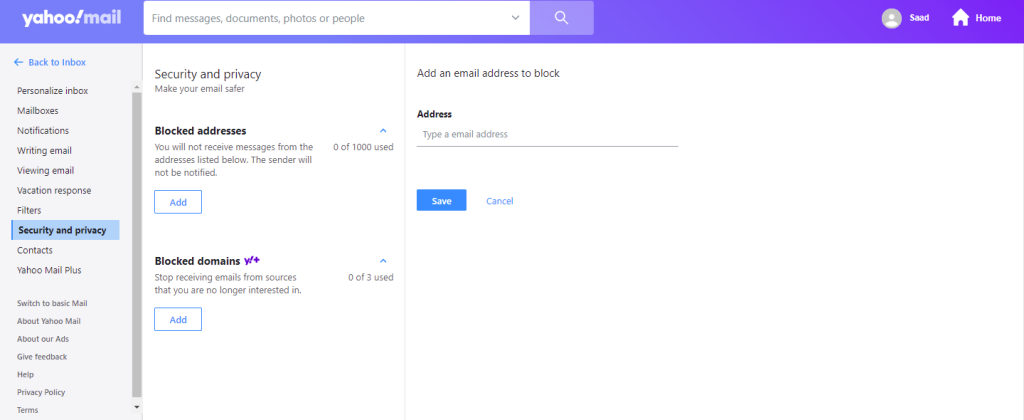
Yahoo needs 10 days to block unwanted emails in your email address. Like all other email providers, you can also mark an email address as spam and unsubscribe from that email by clicking the available link in the sender’s email.
How to delete spam in batches through the tool?
If you use multiple email service providers such as Gmail, Yahoo, or Outlook, and are tired of deleting unnecessary emails to free up space, then I suggest you use this tool to save your time.
Expand.me
Unfold. me is a tool used to unsubscribe different types of email addresses at the same time. Through an automatic program, it deeply analyzes the user’s entire email and gives a list of unwanted emails, through which you can easily cancel all of them. The Unroll.me team assures us that they will not read or enter users’ emails. The entire process is end-to-end encrypted.
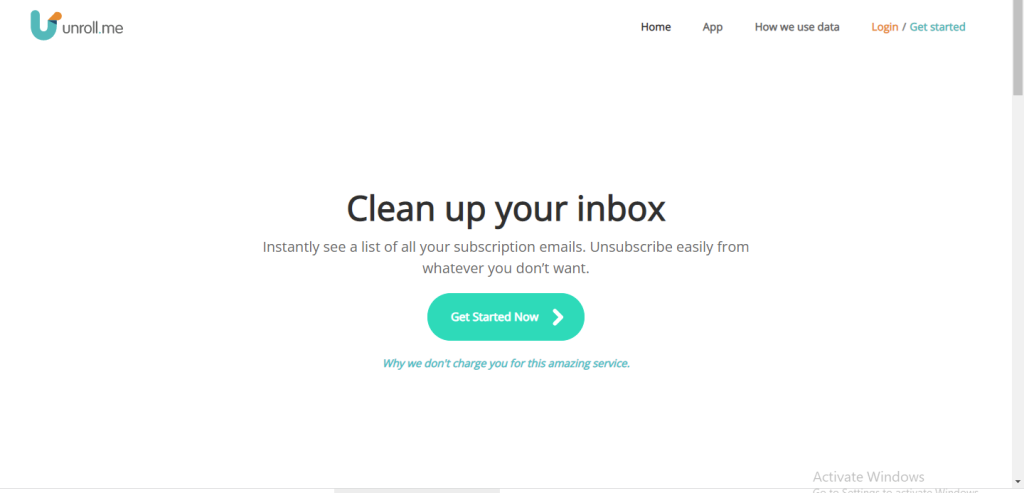
Moreover, the basic functions of this software are all coat-free. Unroll.me is also available on Google Play and App Store. The login method is simple and you can proceed without any problems. This is the best choice to save time to unsubscribe and delete unwanted emails.
Final thoughts
Many people search every day to learn how to unsubscribe from unwanted emails. This article fully guides you how to unsubscribe from unwanted emails. You won’t have to worry about spam popping up in your inbox day after day. This detailed article provides comprehensive instructions on all email service provider platforms to cancel unwanted and objectionable emails.


