


Disclosure: This content is reader-supported, which means if you click on some of our links that we may earn a commission.
We’ve built dozens—if not hundreds—of WordPress websites over the years. We rolled up our sleeves and used what we’ve learned, plus a massive round of research on WordPress hosting, to highlight the best of the best. Based on our experiences, Hostinger is the best WordPress hosting service for most because it’s jam-packed with all the features you need to get started, including a free domain name, automatic updates, free themes, WordPress optimized servers, and WordPress pre-installed, all for less than five bucks a month.
The Best WordPress Hosting Service for Most
Hostinger
Best for Most
Plans start at just $1.99 per month with renewal rates at $3.99 per month, making it an excellent option for brand new businesses and those on a shoestring budget. Includes automatic WordPress core and plugin updates, a site building wizard, WordPress acceleration, and a robust database of WordPress tutorials.
Our #1 WordPress hosting recommendation is Hostinger. Not only is it one of the cheapest options we tested, but it also has the best server response times out of all the shared WordPress hosts on our list. If you’re looking for speed on a budget, Hostinger is the way to go.
All plans come with dozens of WordPress-specific features and benefits, including automatic core and plugin updates, hundreds of tutorials and how-to guides for maximizing the WordPress platform, free themes, and a WordPress caching plugin that makes your website load two times faster than it would without it. Get started with Hostinger for just $1.99 per month today!
The 8 Best WordPress Hosting Service Options to Consider:
- Hostinger – Best WordPress hosting services for most
- SiteGround – Best performance for beginners on a budget
- Flywheel – Best for agencies and freelancers building sites for clients
- DreamHost – Best for month-to-month WordPress hosting
- WP Engine – Best for high-traffic WordPress sites
- Nexcess – Best value for fully managed WordPress hosting
- Bluehost – Best bundle for WordPress hosting and a domain
- Kinsta – Best extra-mile customer support
When It Makes Sense to Invest Into WordPress Hosting Services
Whether you’re creating your first WordPress site or have hundreds of sites under your belt, WordPress hosting services are built specifically for sites like yours.
While you can use any type of hosting, WordPress hosting typically offers a fine-tuned environment that’s optimized specifically for WordPress sites. So, you should see better performance and security out of the box.
There are two types of WordPress hosting: shared and managed.
If you’re building a new site from scratch, shared WordPress hosting is the most cost-effective option. It’s a great place to start and is more than enough for new or small sites.
On the other hand, managed hosting offers superior performance, security, customer support, and proactive monitoring. The downside is that all of those advanced features come with a significantly higher price tag.
It’s a perfect choice if your site is growing faster than your current host can handle, it’s currently experiencing performance problems, or if you want a completely hands-off hosting experience.
However, managed hosting is likely overkill for new or small websites.
#1 – Hostinger — The Best WordPress Hosting Services for Most

Hostinger
Best for Most
Well-rounded and featuring some of the best site loading speeds in the category, Hostinger is a great choice for most people looking to launch a WordPress site. And there are plenty of budget-conscious plans available, from the $4.99/month price for a one-year commitment to the rock-bottom $1.99/month average of signing up for four years.
Overall Score: 3.7 out of 5
Hostinger’s WordPress hosting is designed specifically with the needs of WP websites in mind. And, it has the cheapest long-term pricing for shared hosting on this list.
But, let’s be clear—Hostinger isn’t perfect. It’s lacking in a few areas, including uptime and customer support, in comparison to others on our list.
Here’s how Hostinger ranks in our six major categories:
- Shared Hosting Features = 4/5
- Managed Hosting Features = 0/5
- Pricing = 5/5
- Server Speed = 5/5
- Server Uptime = 1/5
- Customer Support = 2.6/5
Shared hosting features 4/5 – Hostinger’s entry-level shared hosting plan has useful features that add real value to your experience as a website owner.
To start with, the hosting plan comes with an included email account, allowing you to create a professional business email address at no additional cost to you.
You also receive weekly automated backups for your website. This keeps your website safe in case anything happens. You can revert back to a previous backup at any time in just a few clicks.
One of Hostinger’s newest features is a growing library of custom WordPress themes you can use to kickstart the design of your new website. All of Hostinger’s themes are professionally designed and easy to customize to match your brand.
However, one of the most significant virtues of Hostinger is that its WordPress hosting plans are actually optimized for WordPress.
The other shared hosting providers on our list (Bluehost, DreamHost, and SiteGround) only use the term “WordPress hosting” as a marketing tactic to attract WordPress users. In reality, those plans are no different than their flagship shared hosting plans.
With Hostinger, the server itself is optimized specifically for WordPress websites. Any other types of websites have their own shared hosting, so they never interfere with your WordPress site’s performance.
To sweeten the deal, Hostinger’s WordPress plans use LiteSpeed servers, which are lauded for their speed. With that, you can be assured that your WordPress sites are always running at peak performance.
The only thing the entry-level plan is missing is a free domain name. You can buy one from Hostinger for $8.99 per year or through one of our top domain registrars.
Managed Hosting Features 0/5 – Hostinger falls short in this area of our review. They don’t offer managed WordPress hosting. Though, as we mentioned above, their shared WordPress hosting is actually dedicated to the platform, not just another term for their standard shared hosting servers.
Pricing 5/5 – Hostinger has the lowest long-term pricing of any other provider on this list.
If you go with an annual contract, you’ll pay $4.99 per month. The total cost is $59.88 for the first year. After the first year, the price goes up to $6.99 per month (a 40% increase), making the total cost for year two $83.88.
Adding the two together, you can expect to pay $143.76 for two years of hosting.
If you want an even better deal, the four-year plan is $1.99 per month with $95.52 due up front. The monthly rate goes up to $3.99 per month on renewal (a 100% increase). This is the cheapest option for long-term hosting across all the providers we tested.
Server Speed 5/5 – You need a host that’s optimized for WordPress and whizzes past the competition. Hostinger delivers on both.
The average server response time over 30 days was 480 milliseconds (ms). For shared hosting, that’s phenomenal—and it’s the fastest shared host on our list.
To get this data, we monitored Hostinger’s server response time on our own demo site for 30 days.
Here’s a chart that shows the data we collected:
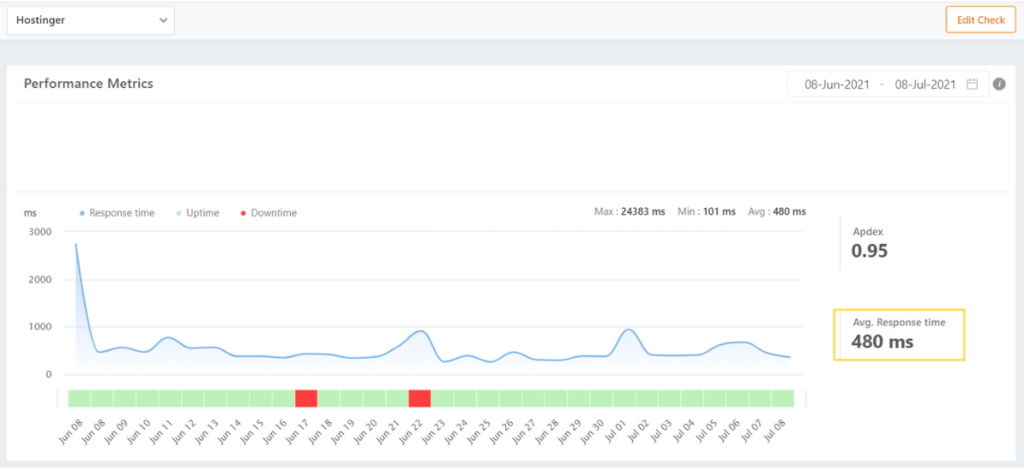
So, what does this mean?
On average, Hostinger’s WordPress servers respond in less than half a second. The average of all the hosts we tested was 630 ms—Hostinger performed significantly better than average.
The best part? That’s without any speed optimization. We didn’t install a caching plugin, compress scripts or HTML, or enable a content delivery network (CDN). The data above is a testament to Hostinger’s pure performance without any enhancements.
So, there’s even room for improvement if you take the time to optimize your site further.
Overall, Hostinger is a great option if you’re on a tight budget but still want blazing fast servers running behind the scenes.
Server Uptime 1/5 – Here is where Hostinger didn’t fully deliver on its promise. Online, the company claims and guarantees 99.99% uptime.
During our 30-day test, Hostinger delivered 99.8% uptime, just a bit shy of what they claim. But, it was the worst performance we saw from any of the hosts on our list.
View the results below:
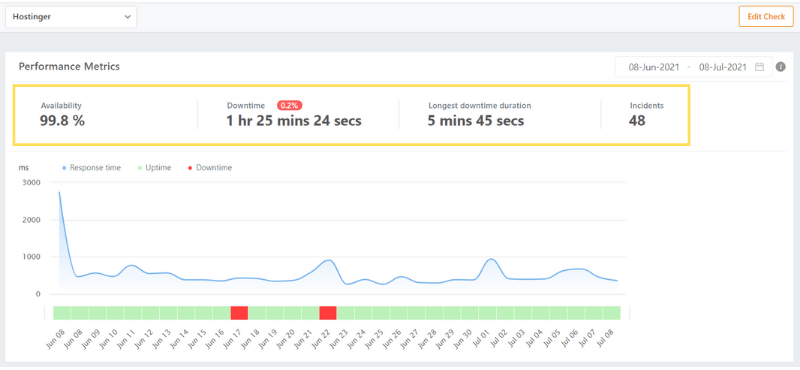
Nearly an hour and a half is a monstrous amount of time for your website to be unavailable in just one month. The longest sustained period of unavailability lasted five minutes and 45 seconds.
Even for shared hosting, that’s not great news.
There were 48 separate incidents that caused our site to go down over the 30-day period.
In this case, they were all caused by a connection timeout that lasted from a few seconds to a few minutes each time.
Usually, connection timeouts happen when your website tries to pull more resources from the server than are available. The server took too long to respond to the end user’s browser, resulting in an error and your site being inaccessible.
Hostinger doesn’t seem to be great at allocating resources on its servers in light of our testing, which decreases the value of its affordable hosting.
Simply, we expected much better results.
Customer Support 2.67/5– A great product is not enough to make you happy. You need a top-notch customer support team that can help you when the time comes, 24/7/365.
Hostinger has pretty good customer support overall. The reps were very friendly, helpful, and non-salesy, in our experience.
We were thrilled to find that the customer service representatives for Hostinger are available 24/7 and have friendly live chat.
But they had very slow response times—the slowest out of everyone.
The first interaction, when we asked how we could improve site speed, took over 15 minutes to get an initial response. With that said, we appreciated the thorough explanation complete with screenshots and directions on where to go.
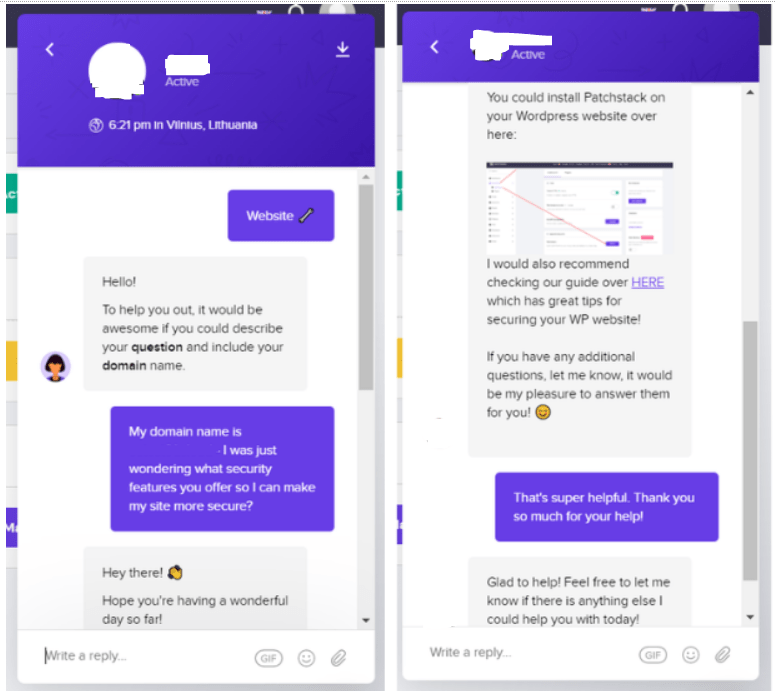
Our second chat took 29 minutes before we started getting an answer to our question on how to set up an email address on our domain. That’s really bad.
But the last interaction took an unacceptably long time to get help. We waited 44 minutes before getting a response. And when we did ask about how we could improve site speed, they casually dropped a few support articles in the chat and that was it.
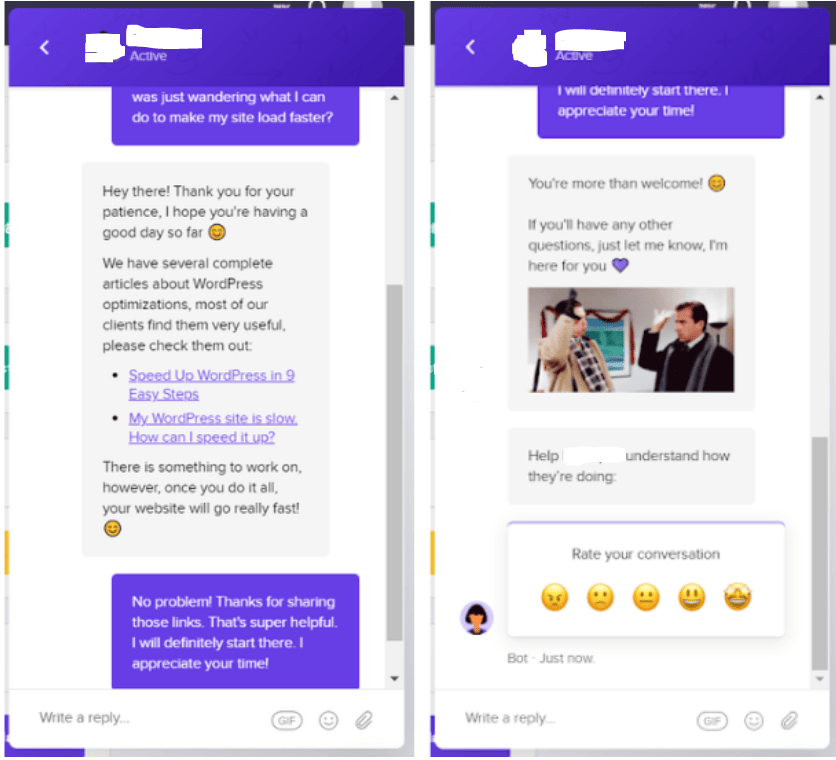
We wished they would have provided a bit more info rather than just sending us to a support article.
Hostinger reps offered helpful responses—however most providers respond in five minutes on average.
So, if you’re looking to get your problems solved by a friendly support team, Hostinger has that down pat. But you’re going to have to be patient and wait a while.
In summary, Hostinger is a solid WordPress hosting choice. You get fantastic site loading speeds at an incredible price. Its customer service may leave a bit to be desired and you may have to get in touch with them to get compensated for unplanned downtime, however.
But overall, in a category with a lot of options, we think Hostinger is the WordPress hosting provider that will work best for most people.
#2 – SiteGround — The Best Performance for Beginners on a Budget

SiteGround
Best Performance on a Budget
SiteGround is known for exceptional customer support, but it also delivers with reliable speed and uptime at a palatable price tag. Get started for just $4.99 per month.
SiteGround is known for three things—reliability, speed, and eco-friendly infrastructure. If you need a provider that can guarantee your website’s accessibility from across the globe, SiteGround is the provider for you.
Along with Bluehost and DreamHost, SiteGround is the third web hosting provider recommended by WordPress. The service is powered by Google Cloud, so you know it’s going to be fast and have increased security features.

SiteGround offers a very solid uptime guarantee. 99.9% of the time your site will be available to your visitors. That’s under nine hours per year of downtime, including scheduled maintenance.
You can also check how your site is performing within their content delivery network (CDN).
Simply put, this CDN makes sure that all your web pages are saved and instantly loaded without server calls after the first time someone visits your site. That makes it faster for everyone else.
If you have international customers and you want to make sure the user experience is not lacking in any way or at any time, SiteGround will be your safe haven.
Another standout feature is the ability to manage client websites as an agency. You can add collaborators with various levels of permission access and you can seamlessly transfer hosting services plus website access to clients as you wrap up the project.
As a full-service hosting provider, SiteGround manages security and updates for your WordPress site. They also offer WooCommerce hosting services as well, which is an ideal option if you’re using it to run an ecommerce store.
If you’re currently using another web hosting provider, you can easily transfer your website to SiteGround for free in just a few clicks.
The only real drawback of SiteGround is its pricing.
While they offer low promotional rates, they tend to spike prices upon renewal. They’re transparent about it, though—all of this is clearly stated on the website and in your contract.
As we’ve talked about before, this is standard practice in the web hosting industry. But SiteGround’s spike is higher than most.
For example, the promotional rate for the GrowBig plan (which is the best seller) starts at $9.99 per month. That plan renews at $24.99 per month when your initial contract expires.
#3 – Flywheel — The Best for Freelancers and Agencies Building Sites for Clients

Flywheel
Best For Freelancers and Agencies
Easily create and transfer WordPress sites to your clients. Team management tools. Excellent customer support.
Flywheel is another lesser-known web hosting service. But they rise above the pack in how they offer hosting plans specifically for freelancers and agencies.
If you or your agency is building websites for other businesses, Flywheel makes it easy for you to create and transfer those sites to your clients.

Freelancers often lose time because of having too many clients while not being organized in a structured fashion. Flywheel’s technology makes running your business a breeze because of custom software engineered for the sole purpose of managing websites.
You can easily transfer the billing to your clients once the site goes live as well. You can still remain as a collaborator on the website, which gives you full access, minus the cost.
Think about how complicated it can be to have to write out all your website transfers and business relationships in a spreadsheet. The hours you need to spend doing this can be used on other more productive aspects of running your agency.
Flywheel offers team management tools, along with web developer tools to make the life of a freelancer simple. Using a WordPress hosting provider that is built specifically for those creating websites or managing them daily is key, so Flywheel is a wise choice if this is how you earn your living.
Flywheel’s plans come with a free SSL certificate, easy SFTP access, free CDN, and custom caching to improve the speed of your website even more, by having pages already loaded ready to be supplied with no hits to the server for information.
As expected with a premium web hosting service, Flywheel has superior customer support. Their team of WordPress experts can be reached 24/7/365. That’s right, all of the support team is well-versed in all things WordPress, so you don’t have to wonder about their ability to solve any issue quickly regarding your website or questions.
If your agency is building websites for other businesses or you are a freelance website developer, take Flywheel for a test drive today.
#4 – DreamHost — The Best Month-to-Month WordPress Hosting

DreamHost
Best Month-to-Month Plans
Basic WordPress hosting starts at $4.95 per month with no long-term contract required. DreamHost also offers managed hosting and VPS hosting for WordPress websites, depending on what you need. All plans include one-click (or pre-installed) WordPress installation and award-winning customer support.
Like Hostinger, DreamHost is an affordable WordPress hosting option. The main difference is you can pay as you go, which is perfect for you if you’re on the fence about going all-in on building a blog for the long term.
And DreamHost has been around for a long time, helping beginners get started with confidence.
Like Bluehost, WordPress also recommends DreamHost as a preferred hosting provider. Plus, they have over 750,000+ WordPress installations (50% of all their users).
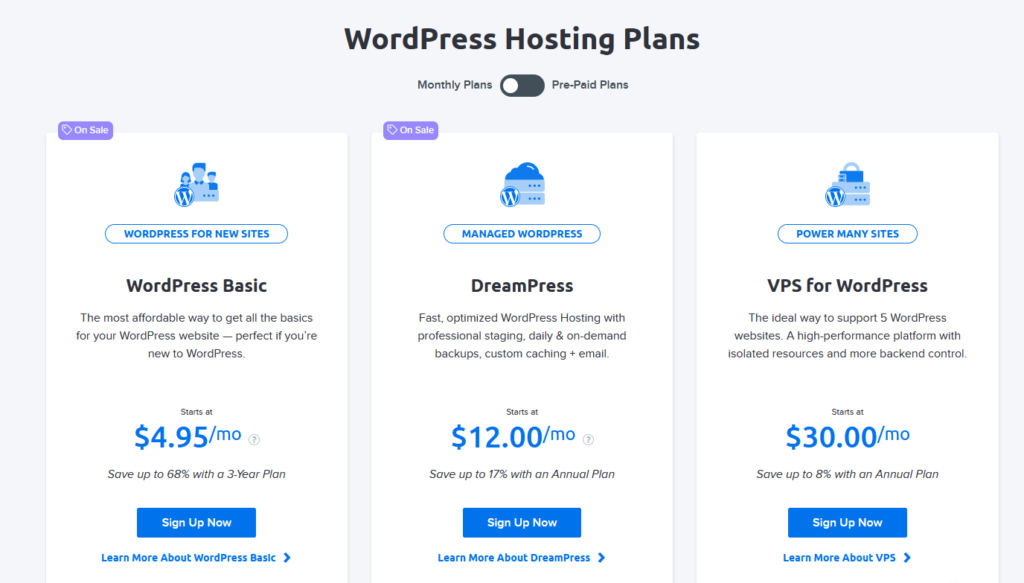
What really makes DreamHost stand out is its incredibly affordable month-to-month pricing options. You can get started for as little as $4.95 per month with no long-term contracts, which is significantly cheaper than any other monthly plan on this list.
It’s important to note that this is promotional pricing and is only good for the first three months.
After that, prices go up to $7.99 per month, which is still quite affordable.
We’ve all made the mistake of hopping into a contracted deal too early before really testing the waters. Whether it be a cellphone, car, or cable promotion… it happens.
But DreamHost doesn’t do what most WordPress hosts do. They give you the freedom to leave at any time and that makes them have to work twice as hard to keep you happy.
Both VPS and managed hosting are available too. Well-known brands like Yoast and CNET use DreamHost. You can enjoy promotional discounts as well.
In fact, you can save up to 63% on basic WordPress hosting, 17% on managed hosting, and 8% on VPS hosting by paying for three years in advance.
But excellent month-to-month prices aren’t the only reason DreamHost ranks so high on our list. You’ll also benefit from:
- A free SSL certificate
- Automated backups
- Instant WordPress setups
- Automatic WordPress updates
- Free email hosting
- 24/7/365 expert customer support
And some of these services are priced as advanced features with other providers and DreamHost gives them to you standard.
#5 – WP Engine — The Elite Provider For High-Traffic Sites

WP Engine
Best for High-Traffic Sites
Fully managed WordPress hosting plans with 120,000+ customers in 140 different countries. Includes advanced security, enhanced site speed, and exceptional 24/7 customer support.
Prices starting at $25 per month.
With a name like WP Engine, you’d expect them to specialize in WordPress hosting—and that’s exactly what they do.
They are the bigger, badder brother of Nexcess.
And while it’s not as popular as Bluehost, its services aren’t geared toward the masses. It’s more about specializing in managed hosting.
WP Engine is the best choice for advanced users who need extra security, bandwidth, storage space, site speed, and more.
If you have unique requirements for your site and your traffic is surging like overloaded electrical conductors, WP Engine is the platform you need.
They offer four tiers of service which allow a certain number of websites to be managed. In the Startup tier, one website is managed, the Growth tier will manage up to 10 websites, while the Scale and Custom tiers manage up to 30 sites.
As you can see, these hosting plans can accommodate the needs of high-traffic websites with complex requirements without sacrificing site speed or the customer experience.
WP Engine does have plans for beginners and smaller websites. However, we wouldn’t recommend it if you’re just starting out.
You can get much better introductory prices with other providers and the features included with WP Engine are overkill for most brand-new websites. You want to only pay for what you’re actually going to use.
With that said, WP Engine’s managed web hosting services come with excellent customer support for its clients. And everything is maintained at the server level.
So you won’t have to worry about plugins slowing down your site or manually installing updates.
WP Engine will take care of your site’s security as well. They block more than two million attacks for their customers every day. So, you can rest easy knowing you’re getting the best of the best WordPress hosting services.
#6 – Nexcess — The Best Value for Fully Managed WP Hosting

Nexcess
Best Value for Fully Managed Hosting
Get the performance, speed, security, and support you need without the hassle of everyday WordPress updates and maintenance. Automatic updates and nightly backups included.
Plans start at $19/month.
Nexcess is a provider that offers the best value for managed WordPress hosting in the category.
Managed hosting takes the daily tasks of managing a server, the security of your website, and other complex operations off your plate. Having to remember to update your software, for instance, can cause a major problem if forgotten.
Nexcess’s managed WordPress hosting lets you kick your feet up. There are several details that go into optimizing a site for success over the long term and it can be expensive. But when you compare Nexcess to WP Engine, for example, you see how robust their plan is at a fraction of the cost.
With Nexcess, you get:
- Automatic nightly backups
- Automatic plugin and core updates
- Advanced proactive security measures
- One-click site staging
- 24/7 expert customer support
- A content delivery network
- Unlimited email accounts
As such, you get everything you need to start, manage, and scale your website with minimal management on your part.
On top of that, you also get traffic spike protection with Nexcess’s auto-scaling feature. So, you can rest easy knowing your site loads quickly and offers the best experience possible, regardless of unexpected traffic levels.
You also get a bunch of useful WordPress plugins preinstalled, like TinyPNG for compressing images for faster load times, WP Disable for reducing strain on CPUs, and Async JavaScript.
And you get a team of WordPress experts who know the ins and outs of the platform ready to monitor your site’s performance and deploy the latest technology to keep your site optimized 24/7.
Another standout feature is a 14-day free trial, with no credit card required.
Most providers offer a money-back guarantee, but Nexcess lets you try it out absolutely free before making any decisions.
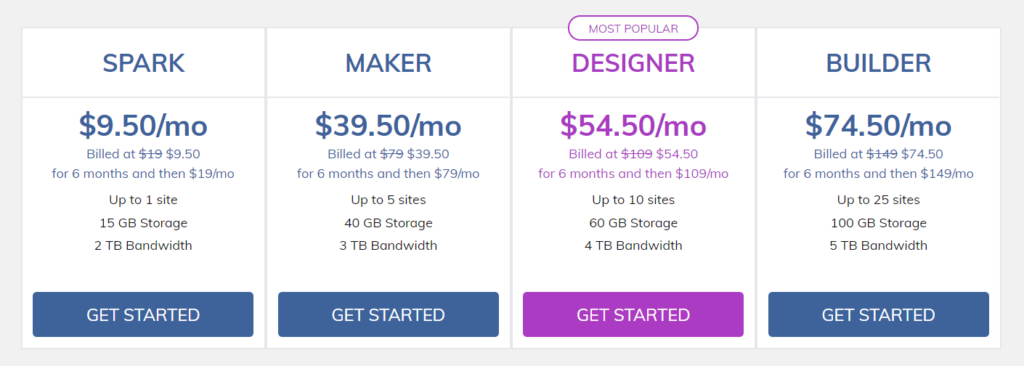
The Spark plan starts at $19/month for one website when paying monthly (use our link to get it for just $9.50/month) and up to 15 GB of storage space.
So, you can start here and upgrade to a better plan with more storage, bandwidth, and websites when you need to.
#7 – Bluehost — The Best Bundle for WordPress Hosting and a Domain

Bluehost
Best Bundle of Hosting & Domain
One of three hosts recommended and backed by WordPress. Includes a free domain name for the first year, one-click WordPress installation, automatic updates, and more. Fully managed WordPress hosting options are also available.
Pricing starts at $2.95 per month.
If you have never heard of Bluehost, it’s okay—you’ve probably been in cryogenic homeostasis for the last ten years. We won’t hold it against you.
But now that you’re back and ready to get to work, this is the best WordPress hosting plan you can find that comes with domain registration.

There are three plans to choose from depending on your needs, including:
- Basic — $2.95 per month (renews at $8.99/month)
- Plus — $5.45 per month (renews at $11.99/month)
- Choice Plus — $5.45 per month (renews at $16.99/month)
What makes Bluehost top shelf is your ability to bundle your web hosting service with domain registration. Through Bluehost, you get a free domain name for the first year.
Bundling instantly creates savings and a streamlined process for managing your website—excellent for beginners. Bundling also keeps errors to a minimum because of having all your websites monitored in one central dashboard.
Plus, you won’t have to worry about DNS configuration or anything like that since Bluehost automatically connects everything on the backend for you.
Furthermore, Bluehost has exceptional customer support available 24/7. If you need assistance, you can rely on the expert support team for help. Plus, the Bluehost staff really knows the ins and outs of WordPress. That’s one of the big reasons why it’s WordPress’s own top recommendation for hosting.
There is nothing worse than having an unreliable provider and having to spend on issues that should be resolved quickly.
And if you’re looking for a fully-managed WordPress hosting service, Bluehost offers WP Pro for advanced users. These hosting plans start at $19.95 per month and include advanced SEO tools, Jetpack premium features, automatic backups, and enhanced video compression.
It’s important to mention, however, that with Bluehost you do have to sign a contract. This gives you the best possible rate. And, since running a website is a marathon not a sprint, it’s a non-issue for most customers.
#8 – Kinsta — The Best Extra-Mile Customer Support

Kinsta
Best Extra-Mile Support
Fully managed WordPress hosting. Resources to accommodate any amount of site traffic. 30-day money-back guarantee.
Kinsta is Google’s flagship WordPress hosting service and takes the guesswork out of hosting your website entirely. They offer world-class technology that other providers really can’t compete with.
Whether you are just getting started or own an enterprise-grade corporation, this managed WordPress platform makes it effortless.
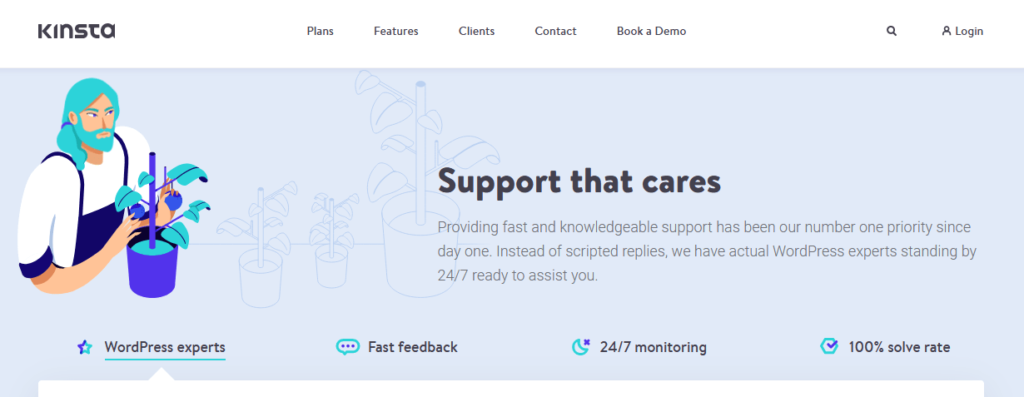
Having excellent support when you just get started is mandatory and Kinsta has the best customer support around. The security for your website is guaranteed, meaning you never have to worry about cyber attacks or malware being a reason your site is down.
Benefits like their hack fix guarantee, daily backups, and free migrations are what make Kinsta’s customers very happy with this hosting option. They have 24/7 server monitoring and check your website’s uptime every two minutes. With a 100% solve rate, they’ve never encountered a problem that can’t be fixed.
Moreover, it has the resources needed to accommodate traffic spikes and varying resource demands. Altogether, this makes Kinsta one of the most appealing alternatives to WP Engine and Nexcess for premium WordPress hosting.
Kinsta is developer-friendly and provides you with all of the tools you need, including the ability to choose your data center.
The MyKinsta dashboard makes it easy to see all your metrics and manage your growing website with simplicity. The tools available are innovative and you can even take the dashboard for a test spin without spending a dime.
Your site runs smoothly because of built-in optimization and the prevention of poorly coded plugins being added to your site. This is because Kinsta limits the kind of plugins you can use to only the highest of quality coded software that meets the rigid standards of Google quality. That may, though, limit your options for customizing your site, depending on your needs.
Pricing starts at $30 per month. As your traffic increases, you can easily scale up from there. You’ll never have to worry about outgrowing this web hosting provider.
Kinsta has transparent overage prices and won’t scale your site down if you go over your plan limits.
The thousands of five star reviews praising the miraculous speed, support and security is undeniable. Kinsta offers a 30-day money-back guarantee and two months for free with annual contracts.
Methodology For Choosing The Best WordPress Hosting Service
If you’re new to WordPress hosting you probably have a ton of questions about what kind of hosting plan will be best for you. When it comes to selecting your provider, it’s best you have the clearest understanding of what you need.
The methodology we follow is clear and concise—it will make you more confident in your decisions and turn your thoughts of uncertainty into focused action that reap results.
The pitfall of not selecting the best option can result in lost revenue, complaining customers because of lagging site speeds, and confusion on what to focus on when managing your WordPress site.
WordPress hosting comes in four flavors; shared, VPS, dedicated, and managed hosting. Now, as a beginner or even an intermediate user, shared and managed will be the two most appealing options. The former gives you the solution you need at a palatable price; the latter provides exceptional oversight and a boatload of additional features and support.
Let’s break down these two main categories of WordPress hosting first.
Shared Hosting
Shared hosting is the most popular hosting option for anyone just starting a website. For your WordPress site, it means your resources are spread amongst a group of others on the same server.
This is the cheapest way to start because the overall cost for the server maintenance is spread over several users. Plus, most hosts have dedicated dashboards that help you integrate email, security measures and other parameters needed to maintain a healthy website.
Which brings us to the next point.
In lieu of the enticing cost benefits, there are a few things you need to be aware of.
First, you won’t have a dedicated team managing your site. You are responsible for the entire process of how your website runs. The speed of your site, the amount of data used and how much traffic your site receives will affect the site performance of others.
And the same goes for the other sites on your shared server affecting your website speed and performance. Usually there is a limit on the amount of resources your site can use on a shared server.
Another disadvantage is the lack of customization available for you to squeeze every ounce of performance capability from your server.
As a beginner, this is likely a minor factor but one that should be addressed nonetheless. Beginners with small budgets, with low technical knowledge, or who are just getting started online will benefit greatly from shared hosting.
Managed WordPress Hosting
When you are a little more established and need to upgrade from shared hosting—or you want to start with a more feature-rich entry point—managed WordPress hosting is your best choice.
This is essentially a lease of server space dedicated to your website only. The WordPress host will also manage the server for you, so you don’t have to tinker with updates and the complexities of keeping your website safe from malicious attacks. Plus, managed hosting prevents lost data through regular backups.
All activity is monitored on your site and anything suspicious is immediately noticed and dealt with. And speed is a non-issue because it’s only your website using the resources. So, if you have loads of web traffic, it’s no sweat.
As you can imagine this hosting tier is a bit more costly, and it should be. You have a 24/7 problem-solving team managing your site, with strict orders to keep it running smoothly at all times.
It’s imperative to mention the importance of great security. Most WordPress hosts offer some security measures, but some are not enough to fend off attacks from malware and other breaches.
Managed hosting provides features like:
- Multi-step verification when logging in
- Malware protection software
- Firewalls
- Disabled WordPress login pages
Shared hosting plans offer SSL certificates for protection and, depending on the provider, some more in-depth security options. But it pales in comparison to the Fort Knox that is managed hosting.
Regardless, you can always upgrade later to managed hosting from your current shared plan.
Now, let’s get into the meat and potatoes of the key considerations across all types of WordPress hosting.
Uptime
When you own a website and you want to build a brand or a blog that people turn to, it’s important that it be accessible at all times. Uptime is key; you need stability to make sure your site is not down or unavailable at high traffic times.
You’re going to see basically every provider promise at least 99% uptime. While that sounds great, that last 1% is still a key threshold where you’ll see some hosts rise above the rest.
After, 1% of a year is just over 87 hours! That’s a lot of potential downtime to worry about, especially if you’re pursuing a global audience.
The big thing is, no one can provide 100% uptime. Even the best hosts need to carve out scheduled downtime for necessary maintenance and updating. It’s unavoidable, but the way your WordPress host approach this can be a big difference-maker.
It’s necessary to know the operations your provider has in place to make sure scheduled maintenance of your site does not interfere with your website availability. Do they clone your site during updates so people still have access to the most current version of your site why fixes and updates are being done? What provider offers the best preparation for this downtime?
Knowing these little nuances will ensure you don’t lose out on valuable prospects visiting your site, or worse cost you revenue because your payment gateway is inoperable.
Imagine having hundreds of visitors being turned towards your competitor because your site is down. This is a nightmare you can experience if you don’t select a provider that guarantees elite website accessibility.
Speed
Website speed is a weighted metric in Google and is something you need to be aware of when selecting the WordPress hosting provider that will be managing your website.
Bandwidth—which is the amount of space and traffic your website can handle—affects your website load time. And, if your site takes more than 2 seconds to load, you will lose valuable equity in website real estate. Google will not rank your site well.
WordPress sites are usually media-heavy, meaning they have multiple images, video, and other forms of media that suck up bandwidth like a Dyson vacuum sucks up dirt. If you have a WordPress hosting service that cannot handle this extent of hosted media, your blog or business will suffer the consequences.
WordPress also allows you to incorporate plugins to improve speed. However, some of these can add extra bloat to your site, doing more damage than good.
There are a few providers that monitor the kinds of plugins you can use in order to prevent you from unknowingly slowing down your website and sabotaging a successful user experience.
If you are a beginner and start with shared hosting, remember that your resources are limited and having too much media will slow your website performance drastically.
In that case, do your best to keep your website lightweight until you can upgrade to a more capable hosting plan.
Avoid The Pricing Black Hole
Pricing is always a key factor when getting started. You don’t want to add extra expenses that won’t give you a reasonable return on your investment.
The main problem is that novices, and even some intermediate users, don’t really know what their hosting plan actually covers.
This leaves you getting sucked into a hosting plan that is not transparent on what you get. Some providers make this difficult for you to know and that is what you want to avoid.
Why? Because most plans are contracts—you pay for a year or longer depending on if you’re bundling your services for a better deal.
This can be costly because some plans are based on usage, which means you’re paying for an expected amount of bandwidth being used. If you’re a beginner, you may not have the need for all the bells and whistles a more robust plan provides.
On the flipside, there are month-to-month plans that only charge you for what you use. Which is much smarter when you are just getting started. The great thing about our list is that every provider offers clear pricing and transparency about what services are provided and how every part of the contract terms work.
The major pitfall we want you to avoid is paying for a plan that gives you excess features (that you are paying a bit extra for) that you will never touch. Some providers offer custom plans while others will bundle in a buffet of services that sound good to begin with but can drain your wallet over time.
Getting an introductory promotional rate is always alluring, it’s the big dangling carrot guiding you along to click ‘buy now’. But what is just as important is not being charged for things you won’t use, and knowing this will keep dollars in your pocket to use on other aspects of your business.
At Crazy Egg, our reviews take this into consideration, so you can confidently select a provider on this list that you can trust will give you all the information you need to make the best buying decision.
Support That Delivers Speedy Results
Ever call a service provider you use looking for help and after an hour or so have no results? Maybe you have to wait for a call back after they look into something further.
This is exhausting and you probably sit back and wonder, “What am I paying them for?”
This type of service might be tolerable for a cable company, but for websites this can be crippling.
Take, for example, that your site has been hacked. Now, you have customer data and payment history information floating around the internet. Do you want a support team that has to get back to you? Of course not, you want a team that is reliable, that can instantly stop the breach, and that will clear up any issues that will cause further damage.
WordPress is the largest CMS platform in the world which makes them a big target. This means that problems will happen, bugs will need to be fixed, and spending countless hours trying to fix them will cost you.
Oftentimes it can be a simple click of a button you made that causes something to break your site. If you don’t know how to fix it, you want a team behind you that makes customer support a top priority. And resolves issues fast.
Another way to look at this is you don’t only want a support team that can fix problems when you call, but also a support team that is managing things behind the scenes as well. One that has checks and balances in place for major outages or server crashes.
Do your due diligence when selecting your WordPress host by calling support, asking questions, and reading reviews about how they solve problems for other customers.
In the long run, this will be just as valuable to you as the benefits you receive from other features a WordPress hosting provider offers.
Hostinger
Best for Most
Plans start at just $1.99 per month with renewal rates at $3.99 per month, making it an excellent option for brand new businesses and those on a shoestring budget. Includes automatic WordPress core and plugin updates, a site building wizard, WordPress acceleration, and a robust database of WordPress tutorials.
Summary
If you’re using WordPress to create and manage your website, you should look into a WordPress hosting service like Hostinger.
Bluehost, DreamHost, and SiteGround are all “officially” on the list of hosting providers recommended by WordPress. But WP Engine and Kinsta are both exceptional choices if you’re looking for managed WordPress hosting.
For agencies and freelancers that build websites for clients, we recommend Flywheel.
However, you can always refer to this guide when going through the process of choosing the best WordPress hosting service for your specific needs.

This article was written by today’s Daily Eggspert.


