


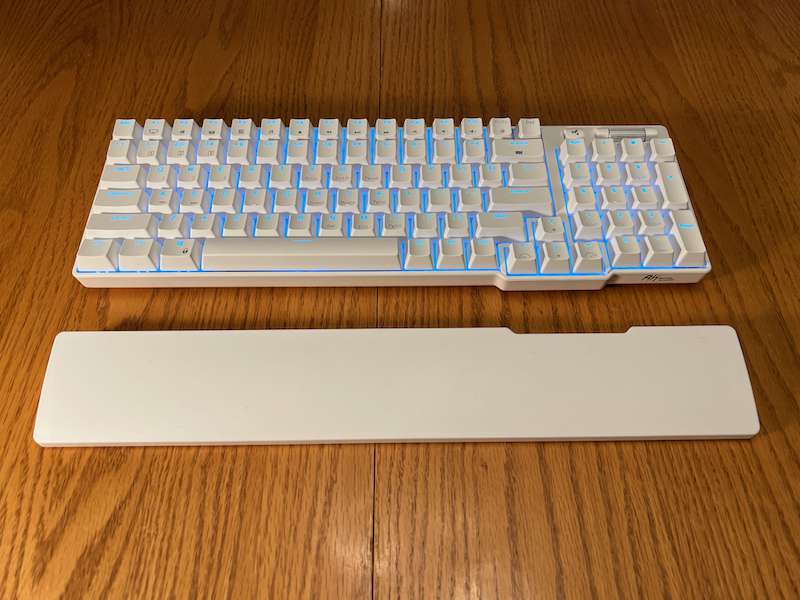
review – The popularity of mechanical keyboards has been on the rise over the past decade or so. Some seem to have an idea of how the keys feel, how they click, and the customizability of a good mechanical keyboard. I’ve been reviewing them lately and I’m really starting to like these types of keyboards. Today I’m reviewing Royal Kludge’s new RK96 wireless 96-key 96% mechanical keyboard.
What is it?
Royal Kludge RK96 is 96 keys, 96% mechanical keyboardwith blue backlighting behind each key, a range of lighting effects and multiple connection modes.
What’s in the box?
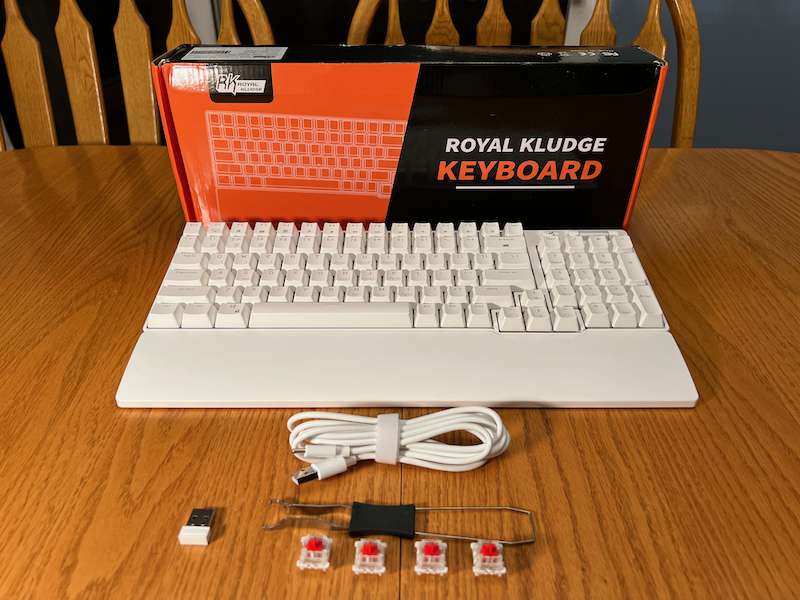
- Royal Kludge RK96 Mechanical Keyboard
- Magnetic hand rest
- 2.4GHz receiver
- USB-A to USB-C cable
- 2 in 1 keycap and switch puller
- User Manual
- 4x replacement switches
Hardware Specifications
- Key switch: hot swap switch
- Additional ports: 2 USB 2.0 pass-through
- light: blue backlight
- Onboard 2.4 GHz receiver storage: yes
- net weight: 3 lbs (1400 g)
- Media keys: yes
- cable: 6ft USB-A to USB-C Cable
- Built-in battery: 3750 mA
- Keycap Type: ABS two-color keycaps
- operating system: Windows XP/Win2000/Win7/Win8/Win10/Mac/iOS/Android
Design and Features
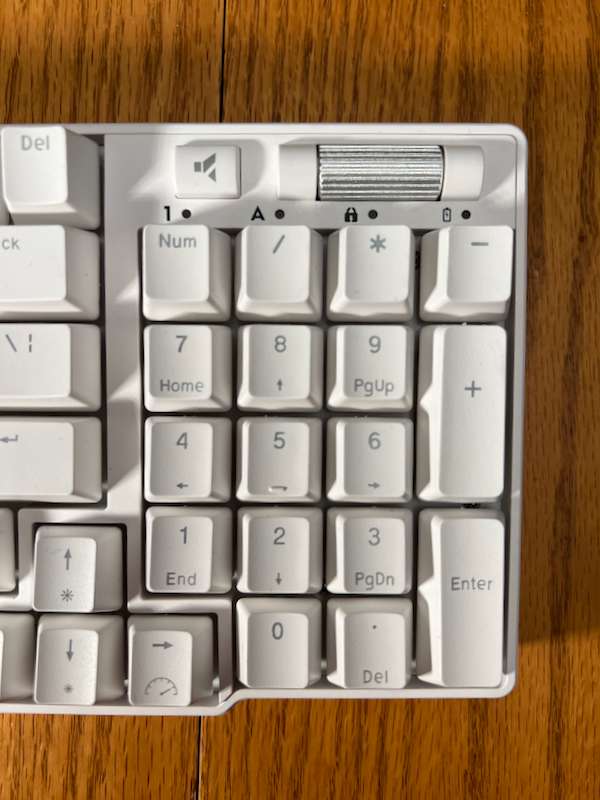
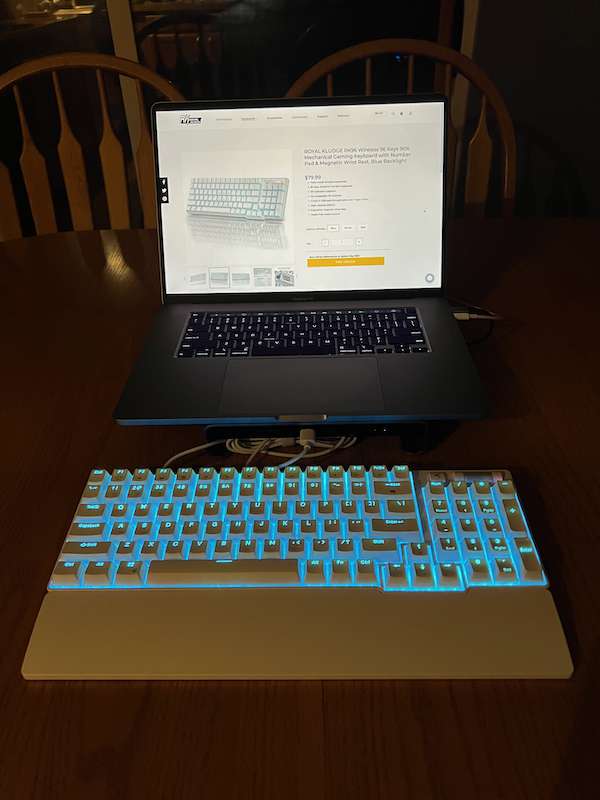
The Royal Kludge RK96 mechanical keyboard is an all-white keyboard with all-blue backlighting. There are no RGB options, but there are a range of lighting effects that change over time, with each keystroke, or stay in a fixed pattern, depending on your mood or preference. The keyboard includes the F1-F12 keys on the top row, the PrtSc and Del keys above the Backspace key, the upside-down T arrow keys, and a full number pad. In addition to all the regular keys, there’s a mute button and a volume wheel above the number pad, so you can adjust the volume or mute the computer at any time.
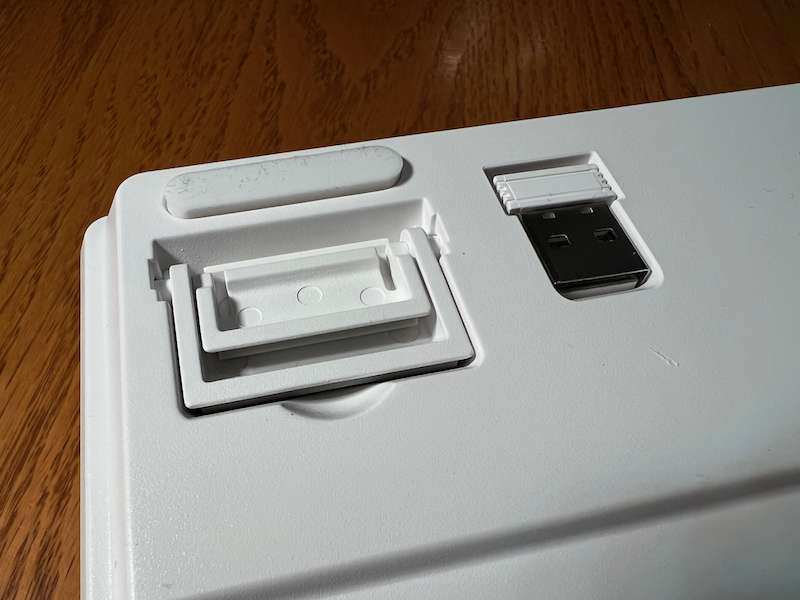
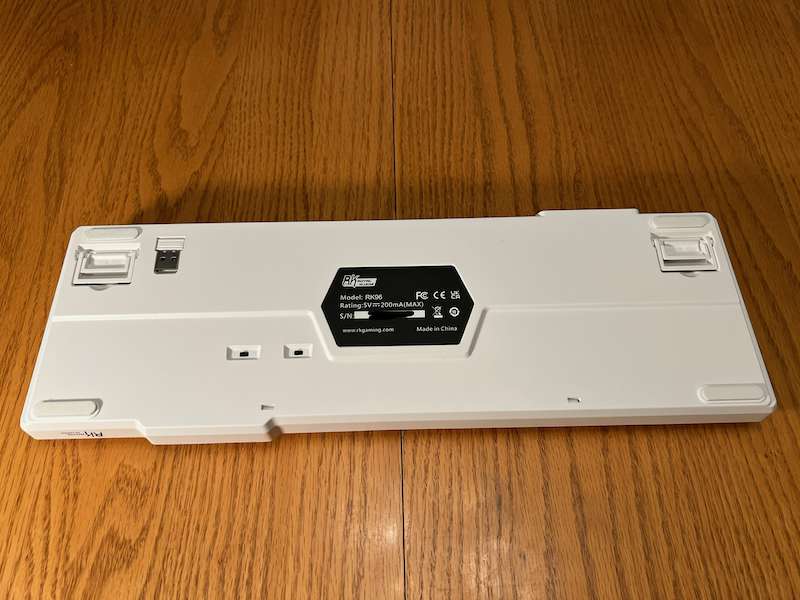
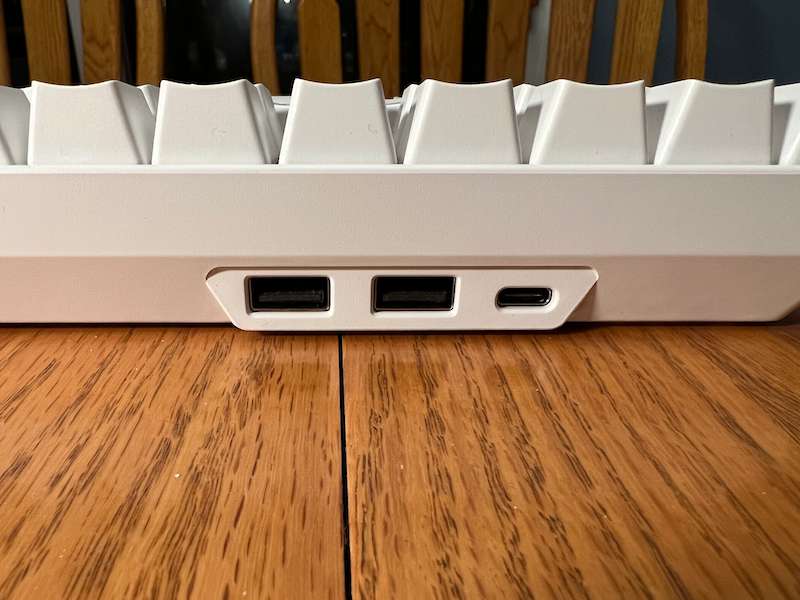
The included magnetic wrist rest helps support your wrist during long typing/gaming sessions. On the back is a USB-C connector for charging the keyboard and connecting to your computer in wired mode using the included USB-A to USB-C cable. Next to the USB-C connector is a pair of USB-A connectors that can be used to connect a wireless mouse receiver, USB thumb drive, or many other USB-A enabled devices.
At the bottom of the Royal Kludge RK96 mechanical keyboard are two small black switches. One is On/Off, which, as the name suggests, turns the keyboard on or off in wireless mode. Another switch toggles between Bluetooth and 2.4GHz modes when you want to go wireless.
There’s also a small USB-A receiver on the bottom of the keyboard for 2.4 GHz wireless use, in a small storage slot. This allows you to use the keyboard wirelessly without having to rely on Bluetooth, which can be difficult or unstable at times. However, if you do want to go the Bluetooth route, this keyboard allows you to connect up to three devices to switch between them using a simple Fn key shortcut.
Mechanically, the keyboard supports hot-swappable keys in either 3-pin or 5-pin switches, which Royal Kludge says supports up to 98 percent of the switches on the market. The RK96 keyboard is equipped with two layers of sound-damping foam, which makes it a very quiet mechanical keyboard, ideal for use around other people or during podcast recordings or live game streaming.
installation and setup
To get started with the Royal Kludge RK96 mechanical keyboard, simply plug in the included USB-A to USB-C cable and connect it to your computer. If you want it to be in wired mode and need standard backlighting, there’s nothing else to do. When the keyboard is plugged into your computer, it also charges the internal battery, making it ready for wireless use via the included 2.4 GHz receiver or via Bluetooth. There is a red light above the “-” key in the number pad that flashes while charging.
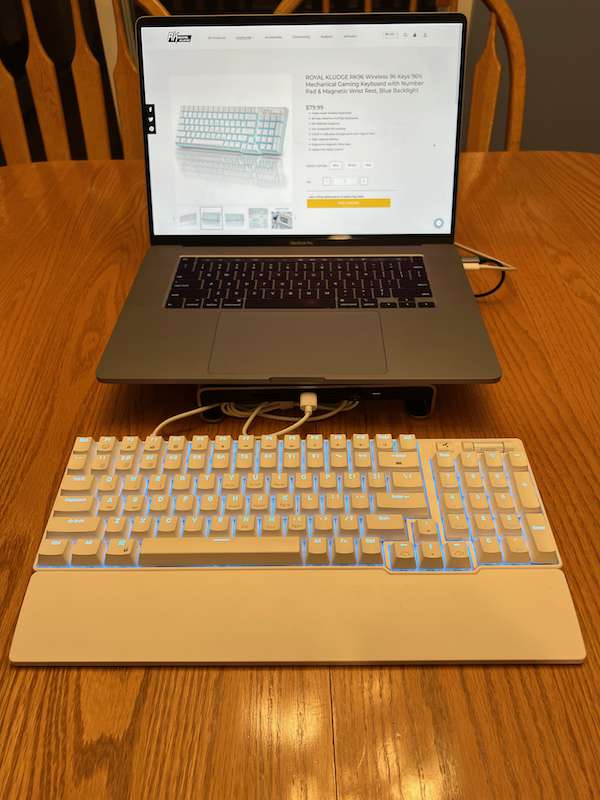
If you want to change the lighting mode, press Fn + PrtSc keys, this will toggle between 20 lighting effects. Some are subtle, some can be distracting, but they’re fun to show off anyway. Press Fn key + up or down arrow to change backlight brightness to 5 levels plus off. For lighting modes that animate across the keyboard, press Fn + left or right arrow to change the speed of the selected effect.
To use the Royal Kludge RK96 mechanical keyboard in 2.4GHz mode, make sure the switches on the bottom are set to On and G, and plug the receiver into the computer. Depending on your operating system, there may be some simple setup steps to follow, otherwise, you’re all set. To check the battery level, press Fn and Enter. Most of the keyboard will be dimmed, and a few keys on the number row will light up. Lights up to 3 = 25% power, 5 = 50%, 8 = 75% and 10 = 100%.
To switch to Bluetooth mode, slide the bottom B<>G switch to the B side. This will start flashing the Q key. The Q, W, and E also have the numbers 1, 2, and 3 printed in smaller, darker fonts to indicate that they’ll be used with the Fn key to switch between up to three Bluetooth devices. Press and hold Fn and Q, W, or E for a few seconds to put the keyboard into pairing mode, and the letters you press flash rapidly.
On my Mac, I see RK96-3.0 and RK96-5.0 as options. I chose the 3.0 option and it worked immediately.
On my iPad, the keyboard only shows up as RK96-5.0. I think these different options are for both bluetooth 3.0 and 5.0 profiles, but I don’t know what’s the benefit of using one or the other.
In the end, I paired the Royal Kludge RK96 mechanical keyboard to my iPhone and wrote this text there as I would type on any computer with a standard keyboard. I don’t have a way to keep my phone upright, so I don’t want to type this way for long periods of time, but it’s pretty cool that I’m able to do it, and seamlessly switch the keyboard to the other two devices whenever I want.
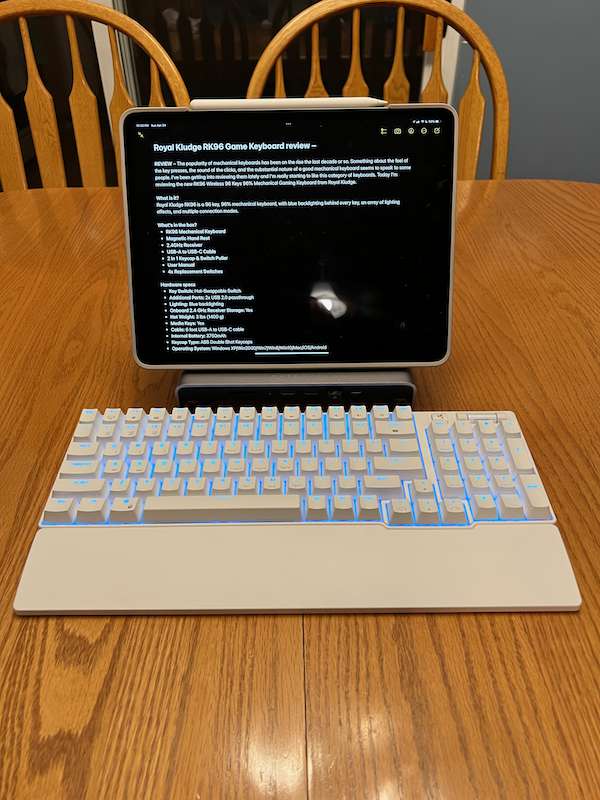
is using
The Royal Kludge RK96 mechanical keyboard has always been a joy to type on. It’s nearly full size, has almost all the keys I need, and the keys feel smooth without much noise. Since I mostly use a Mac, I do most of my testing in that OS. Useful is that the “Win” and “Mac” keys are used in conjunction with the Fn key to switch modes. Basically, it toggles the behavior of the Windows logo and the Alt key. I also use the keycap puller to remove the two keys and switch them so I don’t get confused about what happens when either key is pressed. When I use Parallels or Boot Camp on my Mac, or use it on my media PC, I can easily switch to Windows mode. I don’t switch the keycaps every time, but knowing the keys are where I expect them to be makes a difference no matter what OS I’m using.
I can easily say this is the quietest mechanical keyboard I’ve ever tested, even though my wife heard me write this review and said the keyboard was loud. However, this is all relative. No sharp spring noises, no loud clicks, just nice, soft clicks that I don’t think most people are bothered by.
The USB-A port on the back of the keyboard is limited to USB 2.0 speeds. That’s fine, as they might be used to connect a wireless mouse dongle or wired mouse, but be aware that you won’t get the fastest transfer speeds when using these ports. As expected, the USB-A port doesn’t work in wireless mode. They only act as hubs when connected to a computer.
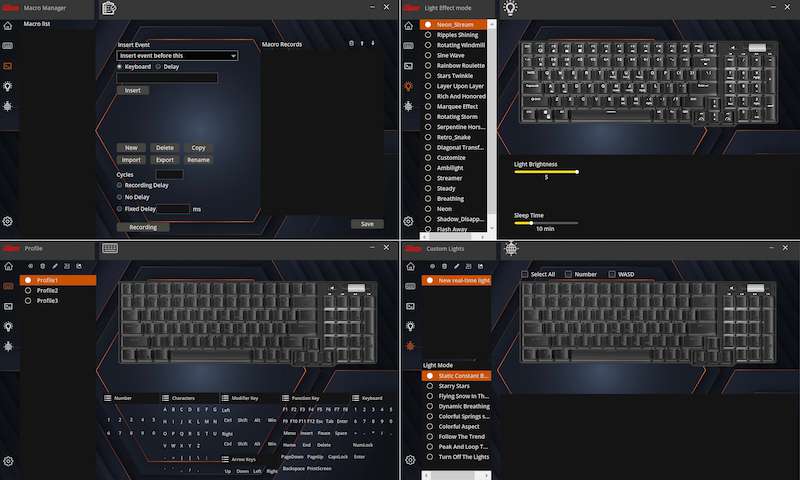
There is software available to configure the Royal Kludge RK96 mechanical keyboard, but it is only available for Windows. From creating profiles to changing backlight settings, creating macros and updating keyboard firmware, there are many nice features. My review unit didn’t require a firmware update during testing, so I can’t say how smooth the process will be.
It took a while to get used to the Fn key to the right of the space bar. I’m used to having it on the left, usually on a Mac to the left of the keyboard. With the full-size keyboard and all the keys, I’m used to it, however, the Fn key is mostly used to change backlight settings, check battery status, and toggle bluetooth modes, which I hope I don’t do more than a few times a day, if that’s the case.
Royal Kludge posted a video on their YouTube page showing the effects and features better than mine.
what do I like
- Multiple connection methods
- Includes keycap puller and extra switches
- Dedicated volume dial and mute switch
- In addition to the flat surface, there are two adjustable keyboard angles
what would i change
- Make a Mac version of the keyboard software. I know it’s focused on gaming, and most gamers are on Windows, but this opens up a larger community, especially for creatives who want a slick keyboard like this in their Mac setup.
- The Num Lock key doesn’t work on a Mac, so the arrow keys and the Home, End, PgUp, and PgDn keys don’t work (at least I don’t know how to use them).
final thoughts
If you’re looking for a premium, relatively quiet, comfortable backlit keyboard and don’t care about RGB lighting, the Royal Kludge RK96 Mechanical Keyboard could be a great choice for you. It has broad compatibility with most switches and keycaps on the market and won’t break the bank.
price: $79.99
Where to buy: rkgamingstore.com or Amazon
source: Samples for this review provided by Royal Kludge.For more information visit their Place.


