


Consider the last time you searched for an Italian restaurant in a new city.
You are not familiar with the area and do not have any personal advice to rely on.
You might turn on your phone, do a Google search [italian food near me] and found several restaurants.
Would you choose the first restaurant to pop up?
The answer to this question is probably no.
Instead, you’re likely to look at customer reviews and choose restaurants where customers have had positive experiences.
Also, you get along very well.
For local businesses, 98% of consumers read online reviews.
Additionally, 81% of consumers use Google as their business review platform of choice to solidify their purchasing decisions.
While customers can control what they post in reviews, businesses unfortunately cannot.
Praise Not a guarantee, even if your business offers great customer service, one unhappy customer can lead to negative reviews.
However, businesses must consistently monitor their Google reviews and ensure spam is removed as soon as possible.
In this article, we’ll cover when or if you should delete a Google review, what to do if you can’t delete a negative review, and what steps your business must take to flag a review for deletion.
When should Google reviews be deleted?
Not every negative review your business receives is eligible to be removed.
If a customer does have a bad experience with your business and expresses that opinion in the form of a review, you can’t ask Google to remove the review.
Instead, Google will only remove comments that violate Google’s policies.
Fortunately for businesses, Google takes its review removal process seriously, and there are many types of content it deems inappropriate.
Below are some types of comments that are eligible for deletion.
civic discourse
“We do not allow users to post content to harassment other people or businesses, or encourage others to engage in harassment. “
It also does not tolerate hate speech or offensive content in comments.
Offensive content may include “obvious and deliberately provocative content”.
Google will also delete reviews that contain personal information, such as credit card details, medical records, and more.
deceptive content
Content is considered deceptive if it is not based on real experience or does not accurately represent your location or product.
Google’s sharing of this content under impersonation, misinformation, misrepresentation, or false participation may also be considered deceptive.
adult content
Google will remove any sexually explicit content that is profanity, sexually explicit, uses adult themes, or contains violence or gore that constitutes adult derogatory content.
Regulated, Dangerous and Illegal
Calls to action for products or services that may be subject to local legal restrictions or content that promotes dangerous activities are eligible for removal by Google.
This also includes inappropriate content that is not suitable for children.
Information quality
As mentioned earlier, Google’s content policy states that review content should be “based on your experience or questions about your experience in a particular place.”
It does not allow content of a political nature, general rants, information related to COVID-19, etc.
The promotion of products, services, or specific businesses in reviews is also not permitted.
In short, if your business gets a bad review, that’s not necessarily a reason to take it down.
Instead, your online review must contain one of the above factors in order to submit a removal request.
If the content of your review contains any of the above, it is necessary and recommended that you request Google to remove the review.
What are Google Reviews?
This may seem simple. However, there are countless online review directories available, and it’s best to clarify what Google reviews are.
Google Reviews can help your business highlight what customers think of your brand and what potential customers expect.
These comments appear in your Google Business Profiles in Search and Maps.
Google Reviews uses a star rating system where customers can leave a one to five star review.
A five-star review means that customers are very satisfied with their experience with your brand.
Conversely, a one-star rating means that customers have a negative experience with your business.
To view reviews on your Google Business Profile, click the business’s star rating or the blue hyperlink with the number of reviews the business has received.
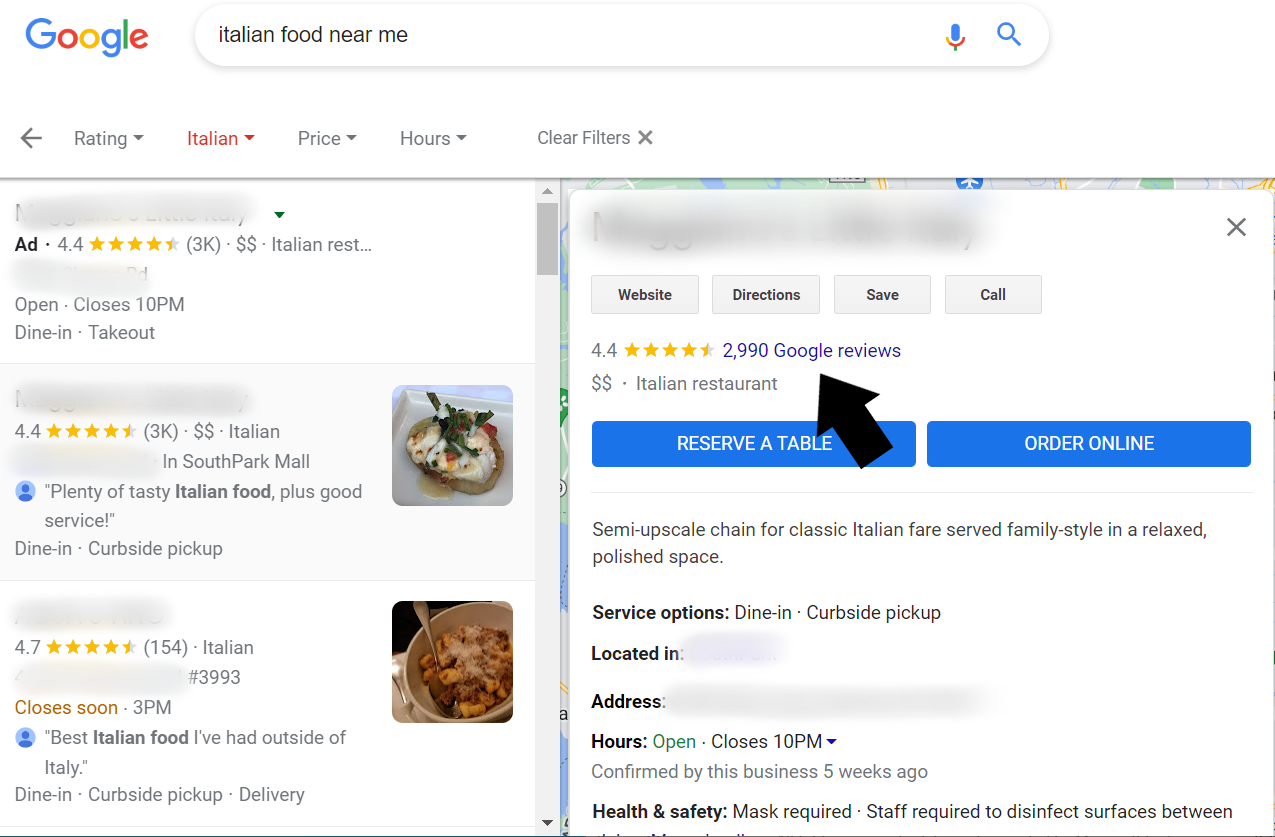 screenshot from search [italian food near me]Google, July 2021
You’ll then see the number of ratings for each star and a breakdown of the top keywords used in the reviews, followed by all reviews for that location.
You can sort reviews by Most Relevant, Newest, Highest Rated, and Lowest Rated.
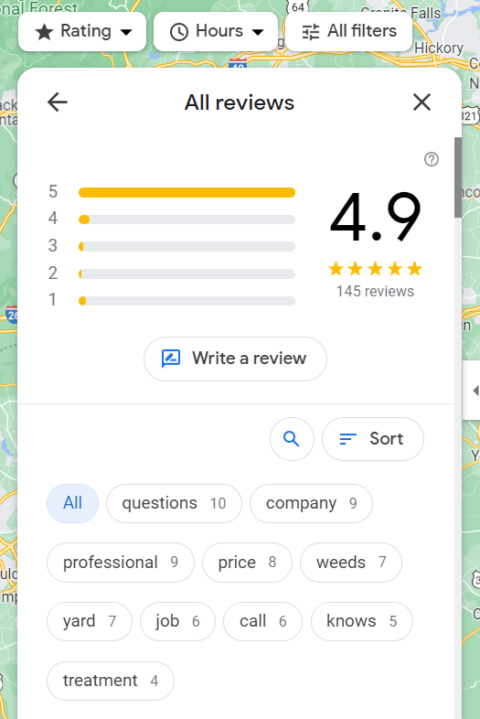 Google screenshot, July 2021
Can you delete Google reviews yourself?
Google doesn’t allow businesses to delete reviews from their Google Business Profile.
This helps prevent businesses from removing bad reviews for bad experiences.
To remove a review, the person who wrote the review can remove the review, or the business can ask Google to remove inappropriate reviews.
Businesses can report reviews for removal through Google Maps or Google Search.
Here are the steps to take for both.
How to Mark Reviews on Google Maps
- Open Google Maps on your computer.
- Find your Google Business Profile.
- Find the comment you want to report.
- Click more, mark as inappropriate.
How to Tag Reviews in Google Search
- on your computer, go to google.
- Find your Google Business Profile.
- Click on Google Reviews.
- Find the comment you want to report.
- Click More to report a review. Then select the type of violation you want to report.
How to tag comments in your account
- on your computer, Sign in to manage your Google Business Profile.
- Select the comment you want to report.
- For a single business: Open the Google Business Profile you want to manage. In the menu on the left, click Comments.
- For multiple businesses: On the left menu, click Manage Comments. Then use the drop-down menu to select a location group.
- On the comment you want to report, click More to report it as inappropriate.
-
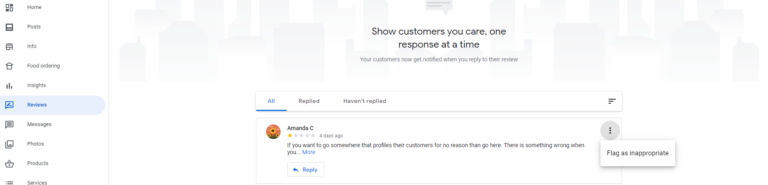 Screenshot of Google Business Profile, May 2022
-
Google also has its own censorship precautions.
It automatically detects spam or fake reviews and deletes them on its own.
“These measures help improve people’s experience on Google and ensure the reviews they see are authentic, relevant and useful.”
After you flag a post on your Google Business Profile for removal, Google will note that it may take a few days for comments to be removed.
For hotel brands, it’s also worth mentioning that you can’t flag third-party hotel reviews, even for policy violations in the review.
What should I do while waiting for Google to delete the review?
Whether your business receives positive or negative feedback, your customer service team must respond to all reviews.
Replying to comments shows others that you care about customer experience and want to provide the best possible experience.
With a thoughtful response to every review you receive, especially negative customer reviews, you have the opportunity to reshape how customers perceive your business and respond as quickly as possible.
This applies even while you’re waiting for Google to remove spam.
in conclusion
Your Google Business Profile is the digital storefront for your business locations.
It also serves as an opportunity to share customer insights directly through reviews.
However, you want legitimate comments to appear on your profile.
Therefore, you can (and should) flag any review that violates Google’s review policy to maintain an overall strong review profile.
Take action on reviews that match the criteria above to remove them from Google Maps and Search when potential customers search for your brand.
More resources:
Featured image: Irina Shatilova/Shutterstock

