


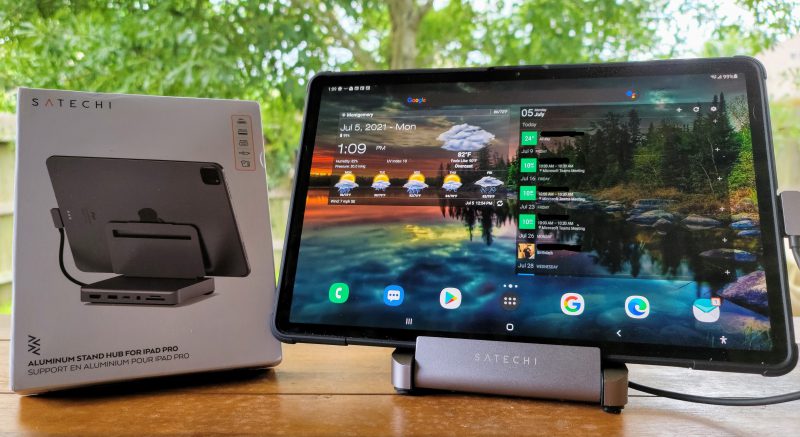
Review – Question: When is a tablet not a tablet? When it becomes a workstation. This is the goal of the Satechi aluminum bracket hub for iPad Pro (more on “for” later). The first question will inevitably lead to the next question-why are you doing this and is it worth the price? Keep reading the answer to this question and discover some additional truths about this booth…
what is it?
The Satechi Aluminum Stand Hub for iPad Pro is essentially a docking station for a tablet, much like the docking station you might use with a laptop. It requires a USB-C connection to the tablet (sorry/not sorry, iPad Air and Mini users!) and expand your tablet by adding an HDMI v2 port capable of driving 4k displays at 60HZ, and a USB 3 type A port for data Computer transfer (thumb drive or other external storage), USB-C power transfer port that can handle up to 60 watts of power, 3.5 mm audio jack and slots for SD and micro SD cards. The PD port on the back can simultaneously charge your tablet and support the power requirements of old storage media (such as spinning hard drives).
What’s in the box?
- Satechi aluminum bracket hub and included USB-C interface cable
- User manual and safety guide
Design and features
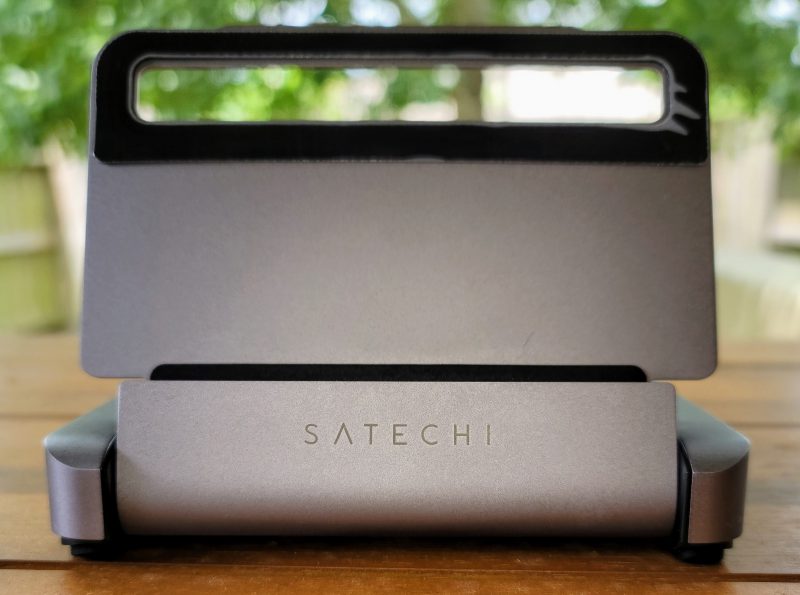
Just like any standard desktop stand, Satechi has a stand to hold the device. There is a soft rubber pad wherever the stand touches the tablet to protect the surface of the tablet. Note the mark on the right side of the upper rubber pad in the picture below. This is not the fault of the tablet stand, but the fault of the reviewer. I did not remove the protective plastic strip from the top of the mat, this is where the plastic pulls away from the rubber.
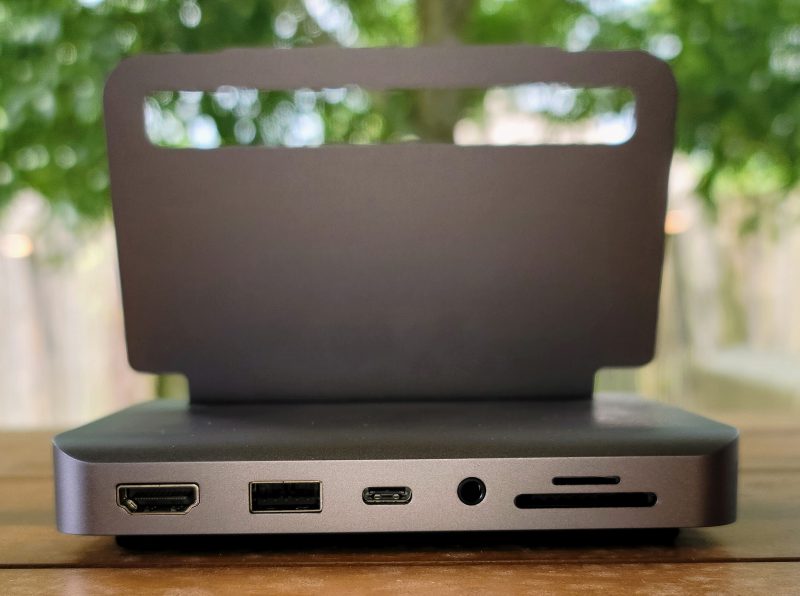
The back of the stand is where all the action takes place-it is the location of the various ports that the stand brings to the desktop. Starting from the left, you have an HDMI port, then a USB 3 Type A port, a USB-C PD port, a 3.5 mm audio jack, and finally a stacked micro SD and SD card slot.
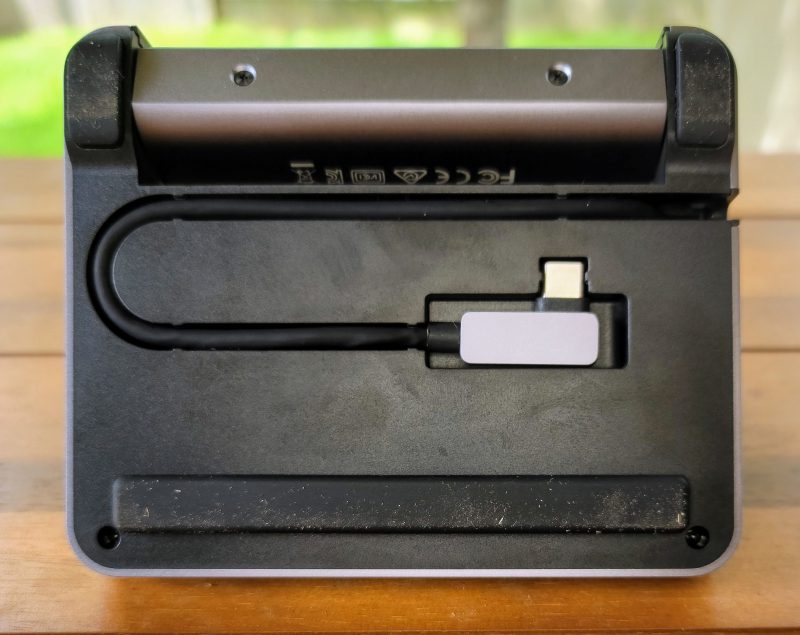
When not in use, the attached USB-C interface cable can be neatly folded into the base. The bracket is partially folded on the top of the base and protects the cables. Plus 10 ounces. The weight makes it a very capable travel companion, although as you will see later, I think this stand has better use cases. The bracket part and the back of the base have rubber feet, which can slightly raise the bracket. The interface cable is about 8 inches long, so it can be connected to a larger iPad Pro or Microsoft Surface Pro 7 and other devices.
How does it work?
Looking at the photos, one might think that this booth is designed for travel. Maybe so-the size and weight are right, but sometimes it’s difficult to find a larger screen to plug into your normal hotel room. I don’t know you, but the idea of dragging the monitor at the same time seems to be inconsistent with this use case.
I think the best point of this stand is to convert your tablet to a workstation. Before you say it-I know that there are many keyboard covers on the market with similar prices, and the larger 12.9-inch iPad Pro is a big screen. But sometimes I want to accomplish something, typing on the mini keyboard and using the trackpad to bypass the screen does not solve the problem. There are people like my wife who have completely abandoned their laptops and are living on her tablets. She has a cute little Bluetooth keyboard for typing, but sometimes misses the convenience of a complete workstation.
This is where the “for iPad Pro” part of the title comes in. Not only that. Similarly, this bracket can support almost any device with a USB-C PD port. So far, I have tried on the following devices, and each device has achieved 100% success:
- Apple iPad Pro (before M1)
- Samsung Galaxy Tab s7+
- Samsung Galaxy Note 20 Ultra
- Microsoft Surface Pro 7
- Microsoft Surface Book 3
Well, to be fair, the last one doesn’t fit the stand-I used the interface cable to plug into the USB-C port and then left the stand empty. The power supply is not actually charged when it is in use, but it does slow down battery consumption. Therefore, it may not be the largest application on the Surface Book 3, but the point is that the stand should be suitable for a very wide range of devices. Don’t use “for iPad Pro” as the only way to use it.
So to what extent is this suitable for workstation use cases? Well, I can enter this comment, picture and everything on it. This is a glimpse of my setup:
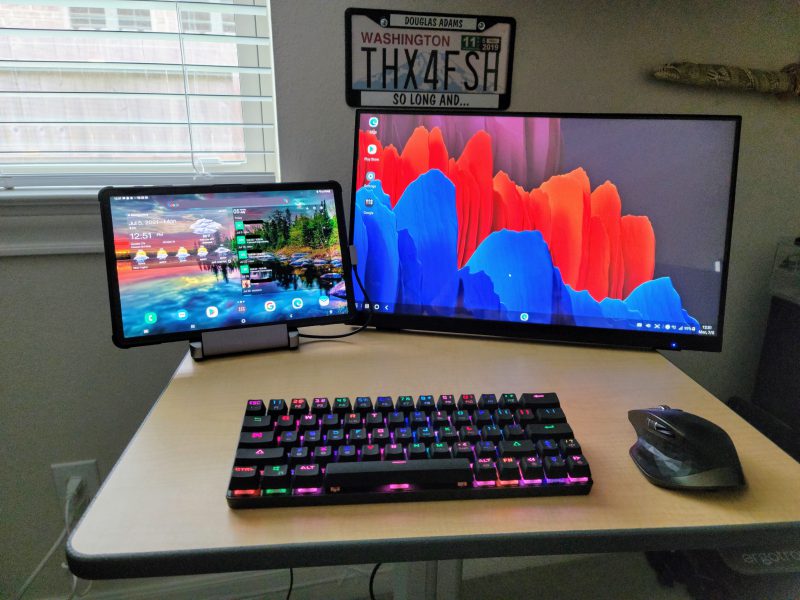
On the stand is my Samsung Galaxy Tab S7+. Connected to the stand is my power source (I have a 45-watt fast charger-if you want to connect a power-consuming device to the USB-A port, I suggest you use a larger charger than the one that comes with the device) Let me The tablet computer is kept at 100% power and a thumb drive with various files. The other end of the HDMI cable is a Planer 22-inch 1080p monitor running at 60HZ. Connected via Bluetooth is the Logitech MX Master 2 mouse and Dierya DK-63 mechanical 60% keyboard.It’s all located in a fantastic Egrotron mobile sitting/standing table.
FYI-When setting up, I also learned that you can use its full functionality without plugging in a power source. Of course, it can drain the tablet’s battery faster, but it can provide power or work in other ways.
The tablet is in Samsung’s DeX mode-this is a piece of software on Samsung’s high-end devices that can bring a Windows-like interface to the device. DeX makes multitasking easier, and the convenience of opening a browser window next to Microsoft Word while you are doing research is invaluable.
So, back to writing a comment about this setting, when I was nearing the end, I found this to be a great arrangement. The Satechi stand helps with this setup, but does not introduce errors or hiccups like some devices. The entire process from initial setup to full functionality is smooth and only takes a few minutes. Throughout the process of writing this review, I have been able to type at full speed, which I couldn’t do on a smaller folio keyboard.
what do I like
- How easy it is to use brackets to improve work efficiency
- It can be used almost everywhere and is consistent
- It is small and light, in case I want to carry it on the road
What will i change
- Maybe make a deluxe version of this stand, just like the stand on Microsoft Surface Studio-good, but not a deal killer
Final thoughts
When I had the opportunity to check the Satechi stand, I was very interested, but not optimistic, it will become an excellent device. I have seen many manufacturers promise basic functions but fail to deliver them. For example, a company produces a device that looks like a laptop, designed for this workstation chassis, but no matter if it is plugged in, I can see my battery drained when using it-and assuming that there is a battery that should at least let I kept the status quo flip for a while.
However, Satechi has kicked the man out of the park. It does what the box says, it does a good job, and it does it on a lot more devices than the product name implies. I really like what this brings to my technical table, so I decided to install it as a permanent installation on my mobile desktop for me and my wife to share. We can pull it to the terrace to drink morning tea and do some work, or push it to the living room to plan the vacation without having to share the link frequently-we can watch the same screen at the same time without me constantly wearing reading glasses.
The Satechi bracket is priced at $99.99, which may be the mid-market price of this device. On the other hand, its functionality and reliability make it a market leader. If you also want to make your mobile device a home office device, then the Satechi aluminum bracket hub for iPad Pro (but not just for use) is the bracket you want to buy.
price: 99.99 USD
Where to buy: Directly from Sada or Amazon
source: The source of this comment is Sada


