


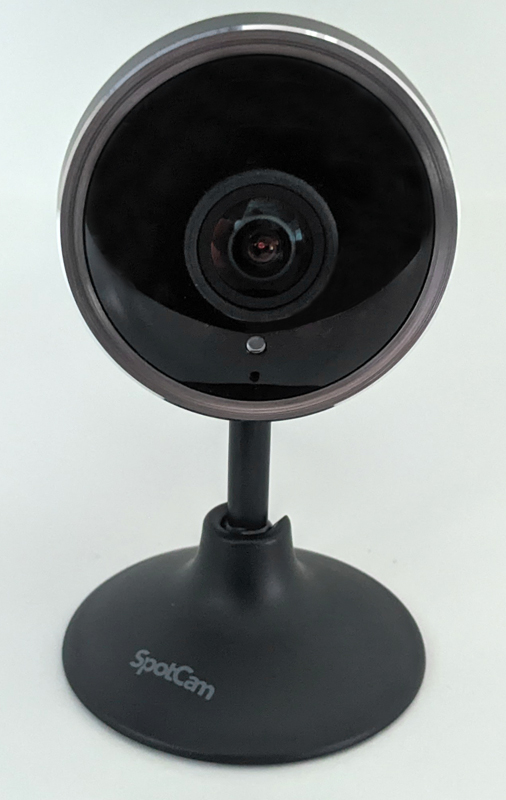
Review -I used it SpotCam camera It has been in my home for a few years, so I’m always looking for their latest products to see if they can enhance my network or add some features that I don’t have yet. I am particularly interested in some features of SpotCam Pano 2, because my current camera set does not have these features. That is, fall detection and digital zoom tracking. So let’s talk about my views on the SpotCam Pano 2 wireless security camera.
What is it?
SpotCam Pano 2 is a wireless high-definition security camera with 24-hour free cloud recording function, human tracking function, fall detection, digital zoom tracking, night vision, two-way audio, alarm and many other functions.
What’s in the box?
- SpotCam Pano 2 camera
- 4 ft 10 in power cord and power supply
- Magnetic bracket and screws
- Quick start guide
Hardware specifications
- Full HD 1080p camera, shooting at 30 fps
- Dimensions: 6.5 x 6.3 x 2.1 inches
- Weight: 12.7 ounces
- Viewing angle: 180 degree fisheye
- Image sensor: 5MP
- Streaming media: H.264 encoding
- Frequency band: 802.11 b/g/n 2.4 GHz only
- Siren alarm for various detections
- Human tracking function
- Fall detection function
- Digital zoom tracking function
- Free 24-hour full-time continuous recording stored in the cloud
- Google Assistant/Alexa/IFTTT integration
Design and installation
Like all Spotcams, you use the app to install the camera on the wireless network and it succeeded the first time I tried it. You just need to follow the prompts on the screen. You can also use the Spotcam website to install it, but I found that using the app is the easiest way. SpotCam Pano 2 requires a wired power connection, so it will limit where you can place it to a certain extent. And it is not waterproof, so you should not use it outside. It comes with a flat non-slip base, so it will not move on any surface you place it on. The camera is located on a slender shaft and can be rotated 360 degrees on the base. You can also fold the camera head and shaft down so that you can place it upright on the wall. Here are some pictures of them.
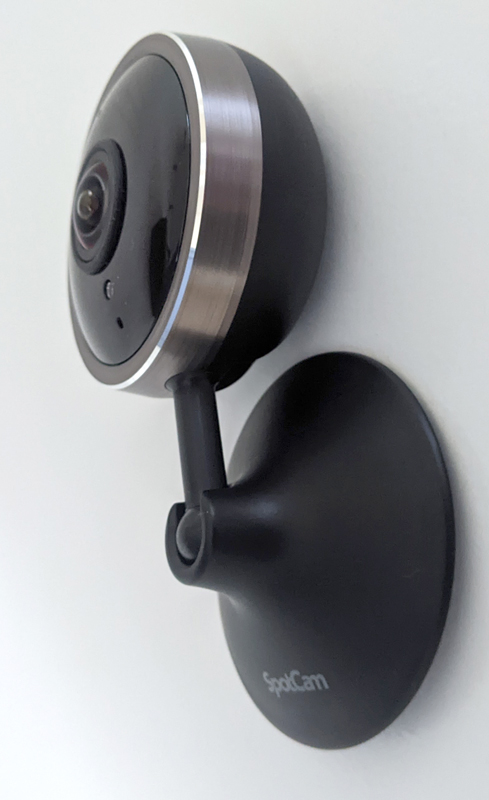
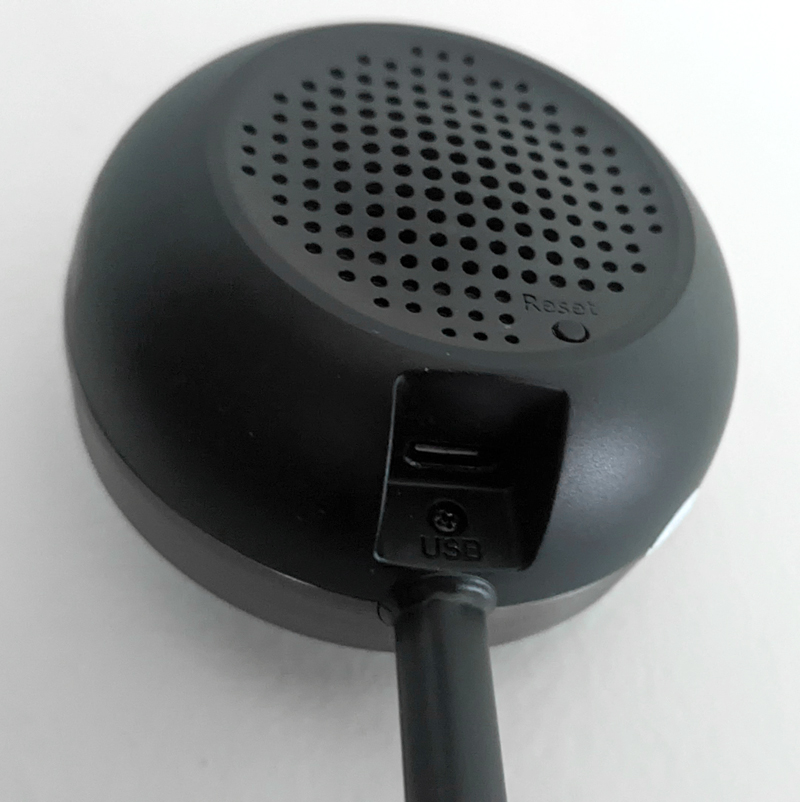
The front of SpotCam Pano 2 is the camera sensor, lens and microphone. On the back, you will find a micro USB connection for power supply, a reset button and speakers.
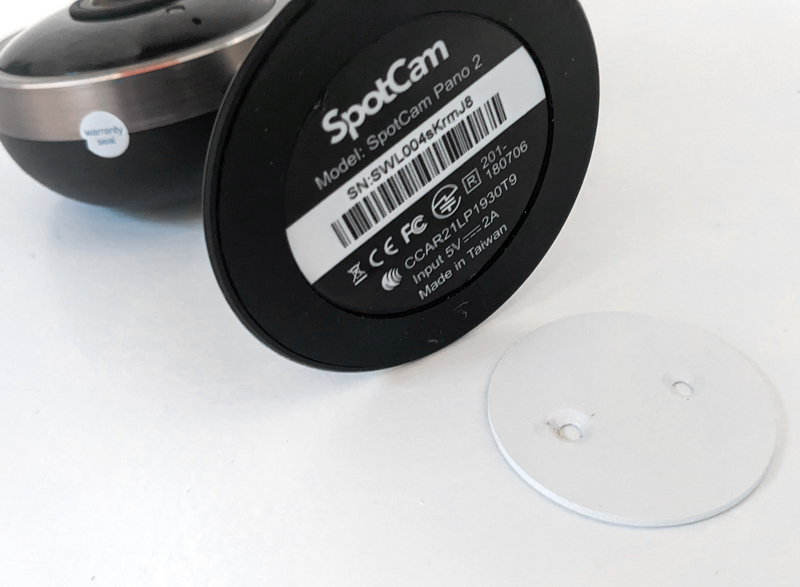
On the bottom of the base, you will find a non-slip rubber surface. Pano 2 also comes with a flat circular metal magnetic stand. Basically, you attach the magnetic mount to any surface you want, and then the base of the camera magnetically snaps into the mount found. This allows you to easily remove it from the surface when needed, but it will hold it in place very firmly. This is a photo:
Features and performance
There are 4 different types of Spotcam cameras around my house, all of which come with some standard features, no matter what type of camera it is. SpotCam Pano 2 also has the following standard functions:
- Motion, audio and offline detection via email/app notification
- Motion mask (shadow part of the image to avoid false notifications)
- Built-in two audio channels
- Night vision
- Reduce flicker
- 180 degree image rotation
- HD/FHD 1080p image (Pano 2 has FHD)
- Scheduled alert period
- Scheduled camera detection cycle
- Use the Spotcam app to install it and control all functions
- You can pay monthly to purchase advanced features, such as 3 to 30 days of cloud storage, baby crying detection, vehicle detection, lost object detection, pet detection, facial recognition, etc.
Some of my cameras are wireless, which means I have to charge them regularly, and some have to be connected to a power source. Some of them are waterproof, so you can use them outside, and some are not. Some of them you can use the app to move around (pan/tilt), while some are stationary. For some of them you can insert a micro SD card for unlimited local storage, while others do not. Some can be mounted on the wall, some can only be placed on the surface. Therefore, you can find a camera that meets almost all your needs.
Generally speaking, all Spotcam products are rugged mid-range cameras suitable for your home or office at a reasonable price. I would not consider them to be top products, nor would I consider cheap products. It’s just a solid mid-range camera with fairly stable performance. Pano 2 continues this expectation, it has built-in two advanced functions: human detection and fall detection. It also includes a new feature that my Spotcam does not have: digital zoom tracking. Let’s talk about these functions.
Human body/fall detection
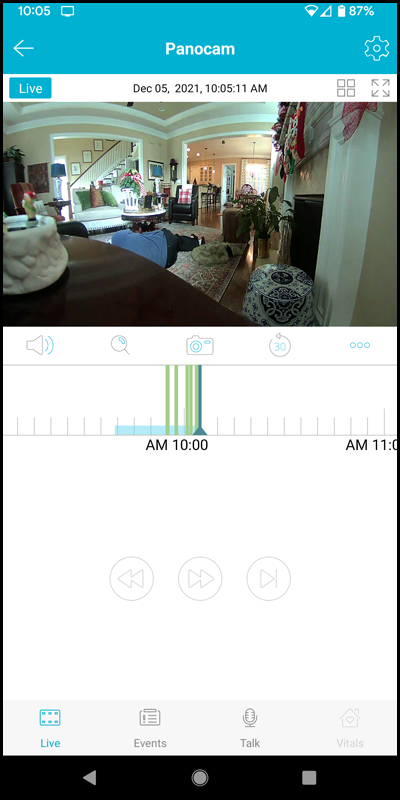
Generally, for most Spotcams, you must pay $5.95 per month for human testing. Basically, the camera only triggers detection/notification when it sees someone moving in the picture. For example, it ignores animals. I tested this in many places around the house and it worked flawlessly. Fall detection is a bit tricky. Similarly, you have to pay for most Spotcam features at $9.95 per month, so it’s cool that SpotCam Pano 2 comes with it. There is a disclaimer stating that this function cannot replace nursing professionals and can only be used as an auxiliary tool for nursing. They also recommend that you make sure to avoid “complex backgrounds.” I doubt whether it applies to my living room, which is a very complicated background with many objects in the field of view. But I tried it (see screenshot below). When I pretended to fall on the floor of the living room about 5 feet away from the camera (see screenshot below), after 5 seconds of inactivity, it notified me that someone had fallen. Very cool. However, when I repeated the practice next to the kitchen (about 15 feet away) away from the camera, the fall detection never triggered. I think the background is too busy. Therefore, the usefulness of this feature is limited, but it can be very useful in certain situations.
Digital zoom tracking
Now this feature is pretty cool. I cannot get this feature on any other Spotcam cameras. When it is turned on, when movement is detected in the camera view, the camera will zoom in and move to see a more close-up photo of the person and follow you. The SpotCam Pano 2 camera cannot be rotated because it is still, but when a person walks around, the Pano 2 digital zoom will follow the movement and show you the “Picture-in-Picture” image in any corner of your favorite camera view. This feature is also very effective and I think it is very valuable, for example, if someone breaks into your home and you need to take photos of their faces closer. This is a screenshot:
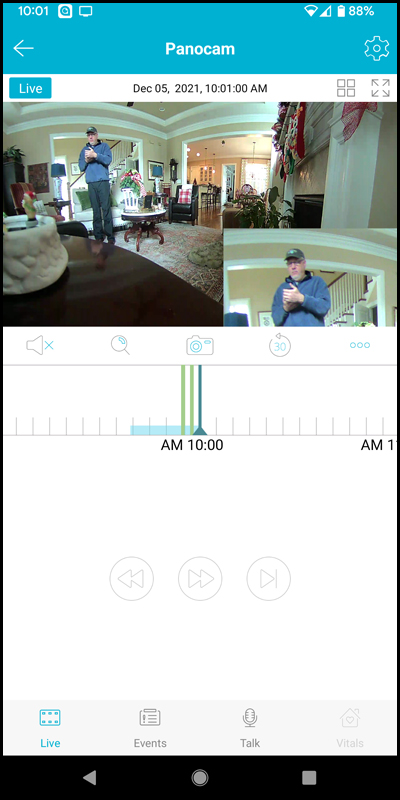
The Pano 2 camera has a 180-degree angle of view, which is often referred to as a “fish eye”, so it can capture a considerable angle of view. Since the Pano 2 camera is stationary and cannot be rotated using the app like some other cameras, the 180 degree angle is very suitable for shooting large areas without pan/tilt. Like some other Spotcams, Pano 2 has a siren alarm notification function, which is very loud and can be used to sound an alarm when movement is detected.
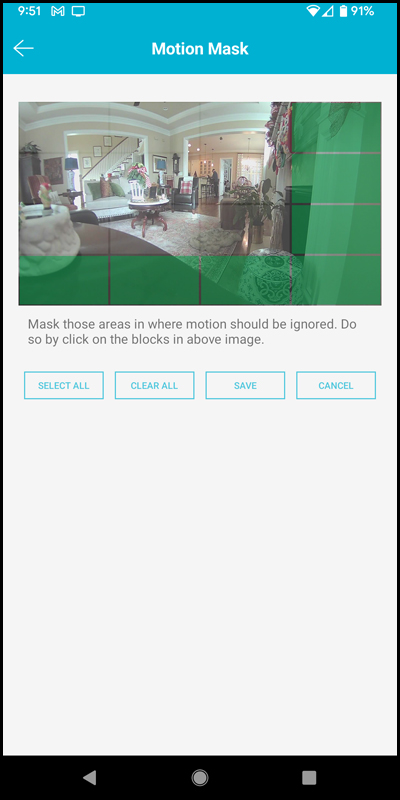
Finally, Spotcam has improved what they call “motion masks”. Basically, the camera’s image can be divided into blocks, and then you can select these blocks so that the camera ignores anything that happens within the blocks you select. This is useful if there are regular movements in the image that you don’t want to be notified about, for example, if the flag is in the camera view and the flag is constantly moving in the breeze. You want to exclude this kind of movement. The improvement is because of all the cameras I have previously, the motion mask only divides the camera view into 6 blocks that I can choose. In my opinion, this is not enough blocks, so I gave Spotcam some feedback, saying that more blocks are needed to choose from. I think they will listen to me, because with Pano 2, I can now choose between 16 blocks! Great improvement. This is a screenshot of what I’m talking about:
what do I like
- Free cloud storage for 24 hours for life
- Digital zoom tracking is awesome
- 5MP Full HD camera images are great
- Preferential price
- Improved sports mask
What will i change
- Built-in battery makes it truly wireless
Final thoughts
The affordable price of $59.99 makes SpotCam Pano 2 an excellent wireless security camera, if you don’t need a wireless connection and there is a place to plug it in. The Digital Zoom Tracking function is great and attractive. The included advanced human tracking and fall tracking functions also work well, but fall detection functions must be carefully considered when placing the camera. If I were to replace some of the old SpotCams at home, I would definitely buy Pano 2 to replace them. I highly recommend this camera.
price: $59.99
Where to buy: camera and Amazon
source: The sample of this product is made by camera.


