


Post views:
1
Vivaldi is one of the best productivity-focused browsers available for desktop and Android devices. Their team of professionals is passionate about providing internet users with a plethora of browsing options and features to ensure they can do what they want to do online with just one click.
The latest update to the browser Vivaldi 5.2 is here to offer even more exciting and productive features. They added a reading list panel to the browser so users can view and manage the books, stories or articles they want to read. Reading Lists, previously introduced in Vivaldi 5.1, are now upgraded to Reading Panels.according to a Desktop version released April 6they also added a privacy stats bar to the browser to let users know how many ads and trackers are blocked by Vivaldi.
reading list panel
exist Vivaldi 5.1 Update, the company introduced a reading list in its browser’s address bar to help users save pages and blogs they want to read later. Vivaldi’s reading list is a built-in feature, and no registration is required to use this feature.
In the Vivaldi 5.2 update, they improved the user’s reading experience by adding a new reading list panel. User can save, view and manage all saved web pages where he/she wants to read recently. Just look for the book icon in the panel to access reading books and other handy tools like bookmarks, history, downloads, notes and translations, and more. The availability of all these tools in the browser sidebar allows users to quickly access and use the different panels.
Vivaldi’s Reading List panel has various perks such as:
List management
Double-click a saved page to quickly open the page in a new tab. Clicking the minus (-) button allows the user to remove pages from the list, and the plus (+) button helps to add new pages immediately. You can also use the eye button to mark saved pages as read or unread.
Search and filter
The search bar available in the reading panel helps users filter the reading list to find the desired page, highlight a specific page or highlight a specific word in the title of a saved page.
Sort and organize
The latest reading panel in the Vivaldi 5.2 update also has a sort menu that lets users sort the list of saved pages by title, reading status, address or date, and more.
Users can also use the right-click menu to find and access options such as opening a saved page, copying a URL, marking a page as read or unread, saving a new page, or removing a page from the list.
Privacy stats bar for ads and trackers blocked by Vivaldi
Research shows that almost 87% of web domains are engaged in digital tracking. And that number is growing every day. Because user privacy is important to the company, they added a privacy statistics column to the homepage, giving users full control over the types of personal data and information the site uses while browsing.The statistics bar also shows the number of ads and digital trackers blocked by the browser in order to provide users with Excellent browsing experience Their details are not exposed to the websites they visit.
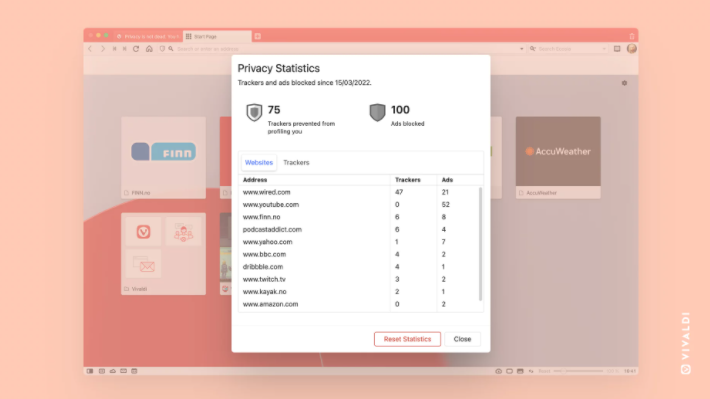
Visibility into these numbers enables internet users to make informed decisions about web browsing and control whether they want to share information with websites. You can see the actual number of ads and trackers that Vivaldi blocks from tracking you or using your personal details (eg IP, location, etc.). All numbers are visible on the browser’s start page. You can also view the number of blocked ads and trackers on the current page by clicking the shield icon visible on the URL bar. If you’d like more detailed information and an overview of your ad and tracker blocking reports, just click the “More Info” button that appears on the stats bar.
If you want to toggle the visibility of privacy statistics, just go to the quick settings panel on the start page and find the following settings in the upper right corner:
Settings → Home Page → Speed Dials
in conclusion
In addition to an improved Reading List panel and privacy stats bar, Reading List is included in Vivaldi 5.2 for Android, so you can sync your saved pages across multiple devices to read on the go.


