


Post views:
1
Snapchat ghost Mode changes are only visible to the user for location privacy. The person’s location will no longer appear in the added friend’s snapshot map.
Snapchat is the world’s largest multimedia sharing application for users to use with friends and family. They can chat, send snaps to friends they’ve added, and see their real-time location on the snap map. Teens widely use social media platforms to securely transmit and send snaps. Users have a lot of location issues to show their friends where they are. Sometimes, they want to hide their location from their friends, but can’t. Here you will learn all the details about hiding and turning on ghost mode.
What is Snapchat Ghost Mode?
Snapchat ghost is your friend’s privacy and location incognito mode. None of your friends will know where you are. By turning this mode on, they won’t be able to spy on you. Everyone has some privacy concerns and wants to go somewhere alone, but also knows the Snapchat location sharing map. He wanted to get rid of this tracking feature before going there. So, in this way, ghost mode gives him all hope. Below are the details for enabling Ghost Mode.
The Importance of Snapchat’s Ghost Mode
When you open the Snapchat app, your location will be shared with your friends. Your Snapchat Bitmoji will be shown to your friends on the Snap Map. This only stops when you close the Snapchat app.but by Snapchat ghost mode, you can choose who can see your location, you or your friends. It’s a safe way to go anywhere your friends don’t want to go. Friends can’t see you on Snap Map with Ghost Mode. However, your friends will not be able to see your location, but they can request to see your location. After you accept their location request, they will be able to see your location.
There is also an option to select some specific friends to see your location on Snap Map. Picking some specific friends to see your location is a better option. To hide your location from everyone, you should turn on ghost mode on Snapchat.
read more:
How to turn on Snapchat ghost mode?
If you want to turn on Snapchat Ghost Mode, you should follow these steps:
- Open Snapchat on your phone
- Click on your Bitmoji profile picture
- Press the gear-shaped settings icon in the upper right corner
- Scroll down to who can…
- press View my location Options
- At the top of this menu you’ll see the option “Ghost Mode”
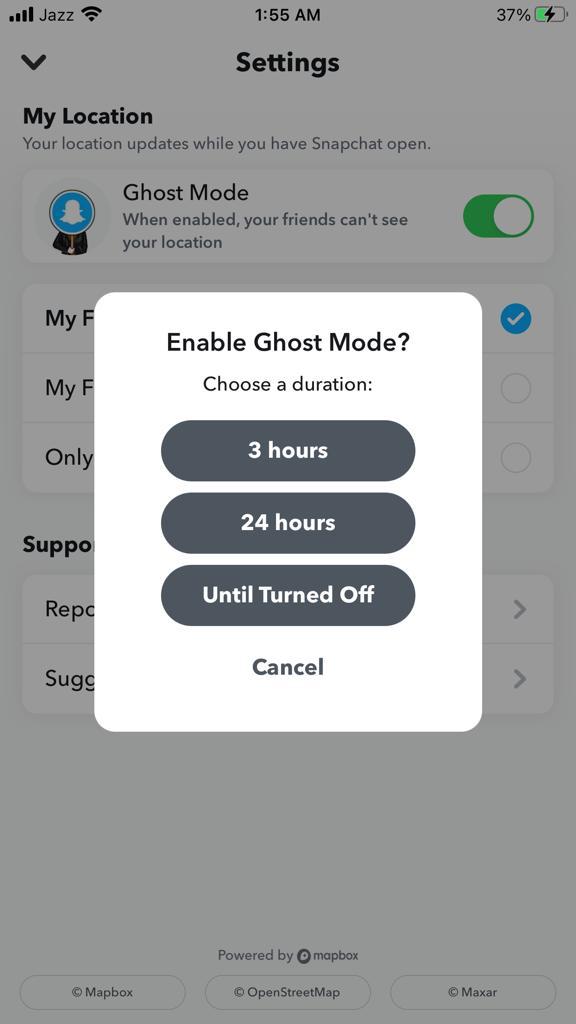
Ghost Mode will be off, and you can turn it on to prevent your friends from accessing your location. You can choose between 3 and 24 hours to keep it on, or a long time until you turn it on. The process for turning this mode on and off is the same.
In the same menu, when you turn off ghost mode, you can choose friends who can see my location,
- my friends, except those you choose
- my friends, show a list of all your friends
- Only these friends you choose on the app
Change location access for Snapchat on your phone
When you install the Snapchat app, it requires the device’s location and other important permissions. You can allow or deny location permission at that time. But later if you feel the app is looking at your location, you can change it by going to your mobile settings. Here’s how you can turn off the app location from your phone to hide your location from friends.
- Open the Settings app on your iOS
- Scroll down to select the Snapchat option
- Click on the location option
- You should now select Never from Location Access
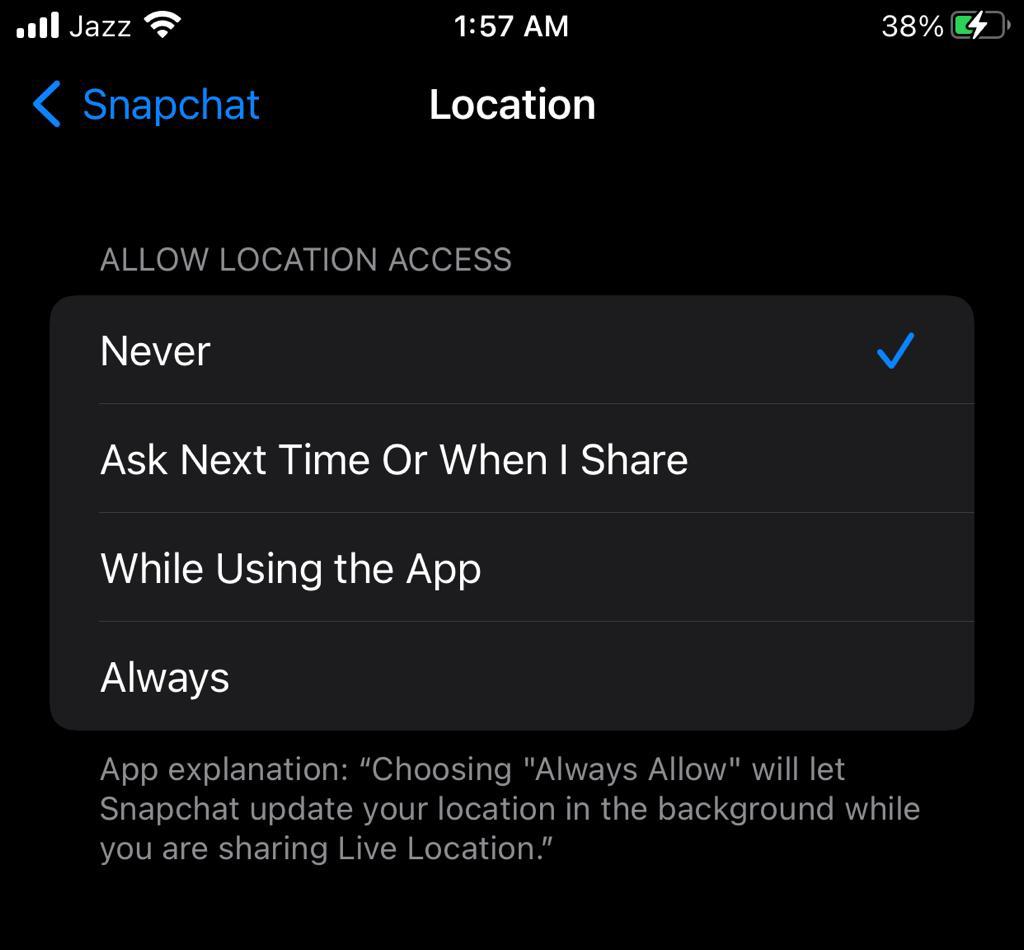
Turning off location access for the app will change all of your customizations to stories and filters based on your location. Doing so will not allow Snapchat to view and share your location via Snap Map. On iOS, you can allow apps to access your location only when you’re using it. This also applies to those who want to be a map but don’t want to share their location.
in conclusion
Snapchat ghost 👻 is a useful feature of Snapchat to hide the location of your activity. If you want to hide your location on the app from your friends, turning on ghost mode is your best option. Mainly every user of the app wants this kind of privacy from their friends. hope! This short instruction will give you the information to turn on ghost mode.


