


Sharing is caring!
iStorage datAshur SD Review Rating
generalize
The iStorage datAshur SD is an excellent hardware encryption drive that gives you the flexibility to expand your storage at a much lower price than buying a new drive.
iStorage datAshur SD is the only pin protected and hardware encrypted USB microSD card reader on the market.
It’s an innovative solution that allows you to get expandable storage at a lower cost than buying a separate encrypted drive.
Specification
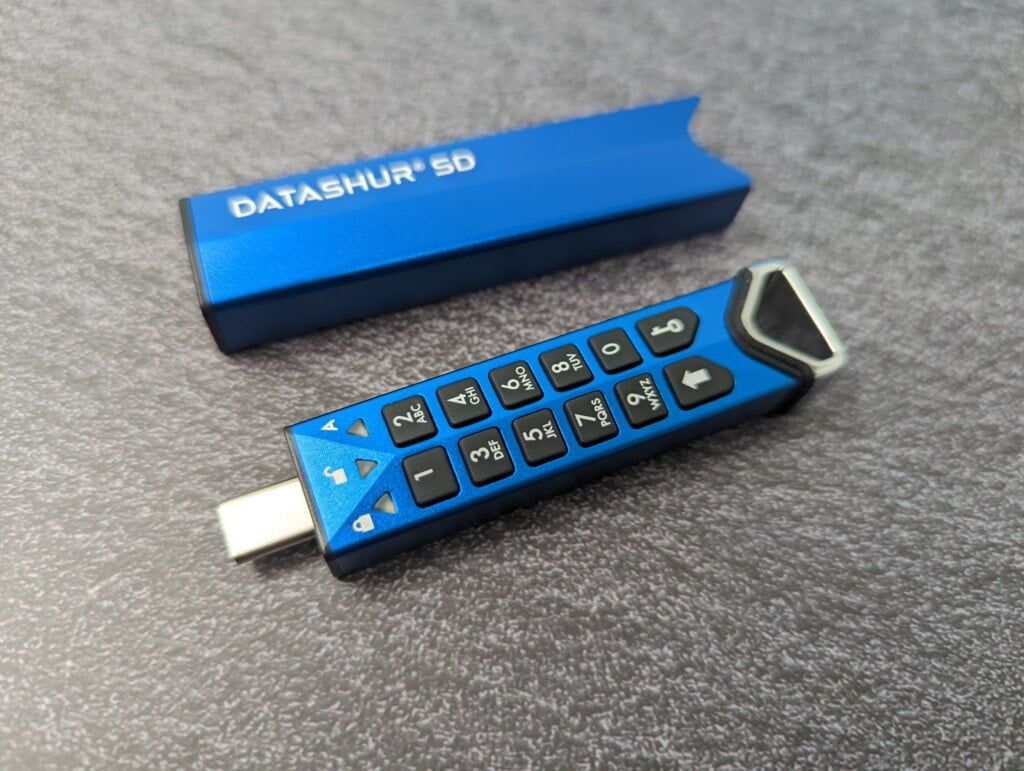
- hardware: PIN Verified, Hardware Encrypted USB Type-C Flash Drive with Removable Encrypted iStorage microSD Card
- interface: USB 3.2 (Gen 1) SuperSpeed - Type-C
- data transfer rate: Read: 100MB/s | Write: 95MB/s
- Battery: 3.7V Li-ion rechargeable battery
- ability: 32 GB64 GB128 GB256 GB512 GB1 TB
- aspect: 87.2 x 19.9 x 13.5
- weight: With sleeves: 34.4 g Without sleeves: 25.4 g
- OS Compatibility: MS Windows, macOS, Linux, Chrome, Android, thin clients, zero clients, embedded systems, Citrix and VMware
- Hardware data encryption: AES-XTS 256-bit full disk hardware encryption
feature:
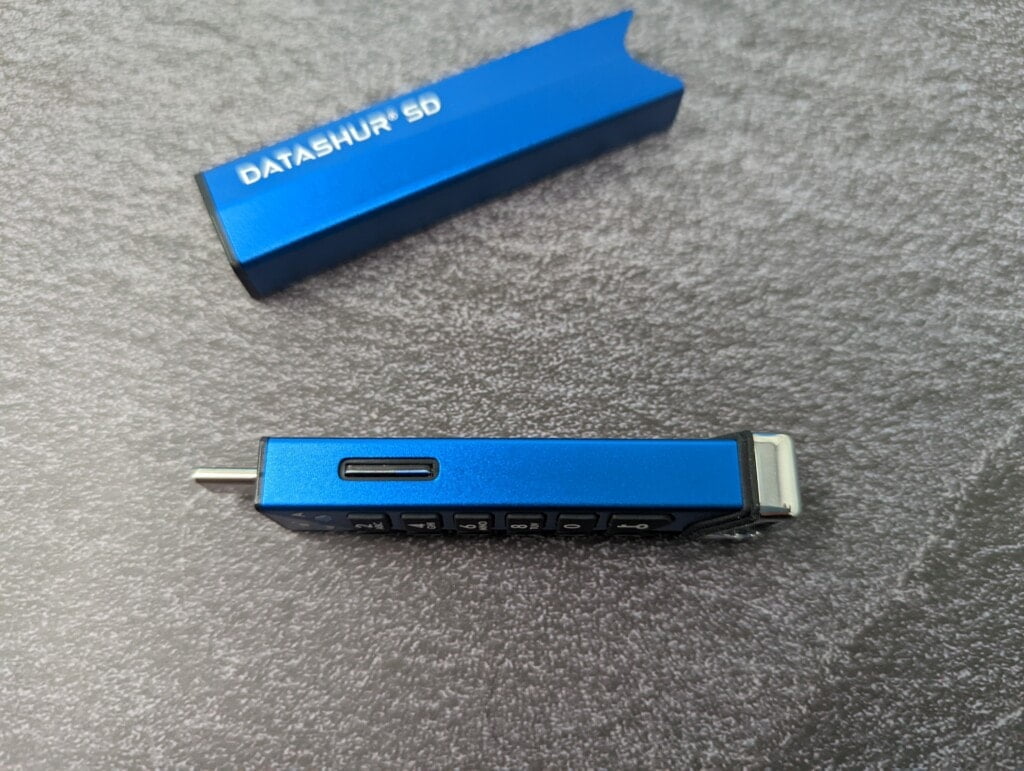
- easy to use
- FIPS 140-3 Level 3 Compliant
- Common Criteria EAL5+ Safety Microprocessor
- Tamper-proof and obvious design
- OS and platform independent
- Separate admin and user PINs
- Dust and Water Resistant – IP68 Certified
- Brute Force Hacking Defense Mechanisms
- automatic lock
- Read Only (Write Protected) – Dual Mode
- Bootable
- User recovery PIN
- User PIN registration
- Network whitelist
- SuperSpeed USB 3.2 (Gen 1)
- self-destruct function
- Drive reset function
- Provide customized services
MicroSD compatibility
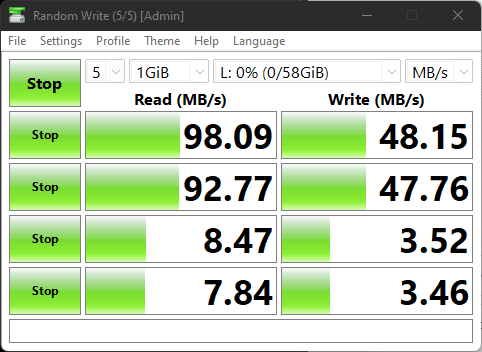
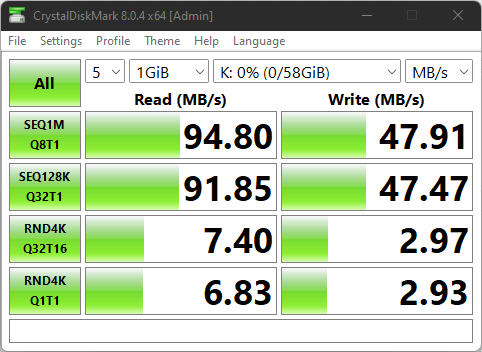
iStorage warns that only genuine iStorage microSD cards are compatible with datAshur SD flash drives.
My curious nature means I want to find out what’s the difference between the official card and the 3rd party card.
First, there is a sizable premium to the pricing. The most expensive 128GB microSD cards on the market cost around £30, while iStorage charges £60.
Out of the box, the iStorage drive works like any other, with read/write speeds of 95MB/s and 48MB/s when connected to a normal USB card reader
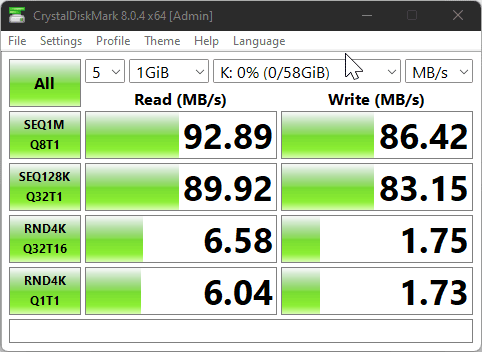
In this review, I happened to hit 93MB/s and 86MB/s with the Kingston Canvas React Plus drive on my desk. Although it has faster sequential write speeds, random reads and writes are slower.
However, if you try to use 3rd Party drive with iStorage datAshur SD and you won’t get very far. After I unlocked the drive and plugged it into my USB port, the green LED was not solid but read and Windows didn’t recognize anything.
It’s probably the best, really. As much as I love finding cheap solutions for things, being cheap is generally a bad idea when it comes to security.
set up
Functionally, the drive works the same as other iStorage devices. You will need to refer to the written instructions on how to run it.
Setting up the drive does not require plugging in, a small battery is built into the drive for safety features. For first time use, you need:
- Insert genuine card
- Hold down the shift key for one second until red and green are solid
- Press and hold the key and +1 at the same time until green changes to blue
- Enter your 8-64 digit administrator PIN and press the key button. The LED keeps blinking green, then turns solid blue.
- Re-enter the new admin key and press the key button.The green LED will flash to indicate that the admin key is in effect
After setting up the admin user, you can set up different users and enable all the various features.The manual for this is too long, iStorage recommends that you refer to online version Not including printed copies.
Using the manual, you can set up new users, and you can put users in read-only mode, preventing them from tampering with sensitive data. You can let the drive self-destruct/erase, which will not only prevent you from accessing the data in the drive you plugged in, it will also delete all users and pins. This then prevents any other drives associated with this from being read.
Use neutral performance
The drive works exactly as you want. Once installed, the drive performs the same as when installed to an unencrypted USB card reader.
With the encrypted data on the card, when I take it out and try to read the card normally in windows, I’m told the drive is inaccessible and has no recognized filesystem. My only option is to format it. I can format it though, so you need to be careful not to confuse an encrypted drive with a generic drive.
Price and Alternatives
Drive-by itself costs £69, then for storage, you have a lot of options, the price per card goes down if you buy them in larger pack sizes, for example you have:
- 1x32GB: £25
- 3x32GB: £71
- 10x32GB: £220
Then the prices for singles of different sizes are:
- 64GB: £40
- 128GB: £60
- 256GB: £100
- 512GB: £170
- 1TB: £300
The hardware specs appear to match the datAshur PRO², which will cost you:
- 32GB: £109
- 64GB: £129
- 128GB: £169
- 256GB: £279
- 512GB: £369
So the microSD iStorage datAshur SD is cheaper and you get 64GB for the same price as 32GB on the PRO². You also get the added benefit of being able to expand your storage space in a semi-affordable way.
For competing brands:
64GB Kingston Data Traveler Vault Privacy will cost you around £135
The SecureDrive Secure USB KP is £126.67 – however, these are shipped from the US, so you’ll be stuck with relatively high shipping and likely import VAT/duties. They are a great option for American buyers.
comprehensive
The iStorage datAshur SD is an excellent hardware encryption drive that gives you the flexibility to expand your storage at a much lower price than buying a new drive.
In terms of security, it has a durable design with military-grade hardware encryption that is both tamper-proof and waterproof for all your needs.


