


Sharing is caring!
With the rollout of gigabit internet in the UK finally making some progress, and many of us working from home, our older WiFi routers and mesh systems may be starting to struggle to deliver the best possible speeds.
WiFi 6E is the latest WiFi standard that easily delivers over gigabit throughput thanks to the new 6Ghz channels. In my review, I was able to hit 1.49Gbits/s at close range using 6Ghz and 907Mbit/s when connecting to the router from different rooms.
Most laptops launched in the past few years should support this, and many phones launched this year as well as some phones launched last year support it. It’s also easy to upgrade a desktop computer to support it.
Mesh WiFi 6E systems aren’t cheap, and there aren’t many options on the market. Due to the quad-band design, there is currently only one system that offers the best speeds throughout the home.
Tri-band and quad-band
With WiFi 6E you have 2.4Ghz, 5Ghz and 6Ghz. So the old comparison of dual-band and tri-band is now tri-band and quad-band.
Essentially, whenever a band is shared between the client and the backhaul, you will see a significant drop in throughput, about 50%, due to signal loss.
WiFi 6E can be even more confusing, as the choice of backhaul becomes more difficult. Most devices use 5Ghz, so you don’t want to share it. However, 6Ghz has a shorter range than 5Ghz, making it difficult to get the best performance.
WiFi 7 vs WiFi 6E vs WiFi 6
I’ve covered the differences between WiFi 6E and WiFi 6, but it’s worth looking at again. Considering that WiFi 5 was around long before WiFi 6, you might be surprised to see WiFi 7 just around the corner. It is believed that the slow adoption of WiFi 6E is due to some vendors’ reservations about WiFi 7.
WiFi 6 introduces various new technologies to improve the overall speed of existing WiFi bands. The maximum theoretical throughput of an 80Mhz 2×2 client changes from 866Mbps to 1200Mbps, or twice that of 160Mhz.
WiFi 6E then adds the new 6Ghz band, which is much less congested and allows for 7 additional 160 MHz channels, compared to just 2 for WiFi 6.
WiFi 7 builds on this and allows for a 320Mhz channel width, which increases the maximum speed of 160Mhz to 4.8Gbps for 2×2 clients.
WiFi 7 also supports double the number of splits, up to 16, giving you a total of 40Gbps of bandwidth.
It then quadruples the QAM, or quadrature amplitude modulation, to 4096, which allows the router to fit more information in each hertz.
WiFi 7 is expected to be complete in 2024, but by then we may see boring devices. Back in February, Qualcomm announced the FastConnect 7800, the first chip to support the standard. MediaTek is expected to announce something soon. Vendors then need to integrate these chips into consumer devices.
Best Mesh WiFi 6E Router
For UK buyers, with only three systems to buy, there isn’t much to choose from. This should improve within a year.
Netgear Orbi AXE11000 RBKE963
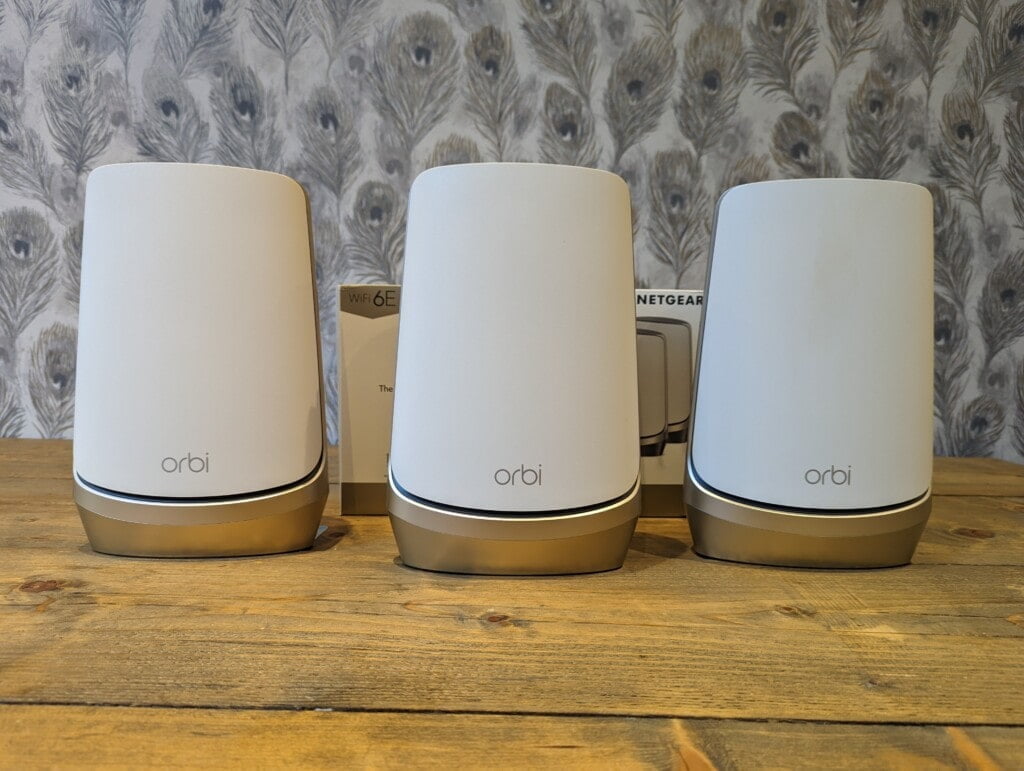
Overcoming the sticker shock of the Orbi RBKE963 is a little harder, but it’s the best WiFi 6E mesh system on the market. If you want the absolute best performance, then you have to pay for it.
The reason for this price is the quad-band design. You have a dedicated 4×4 5Ghx backhaul between the router and satellite, then provide your customers with three separate bands covering 2.4Ghz, 5Ghz and 6Ghz.
Then there’s a 10GbE on the WAN port, a 2.5GbE LAN port on both the router and satellite, plus three gigabit ports.
This is the fastest grid system I’ve reviewed, and it’s likely to stay that way for a long time.
ASUS ZenWiFi ET8
I can only find the Asus ZenWiFi ET8 as a 2-pack system, it’s a tri-band design, so this is much cheaper than the Netgear.
The main difference between the ET8 and the Pro ET12 that I list below is the 12-stream Wi-Fi 6E router: 4×4 (2.4GHz) + 4×4 (5GHz) + 4×4 (6GHz). The ET8 has only 8 streams, 2×2 (2.4GHz) + (2×2 5GHz) + 4×4 (6GHz).
Then ET12 has 2×2.5GbE, one for LAN and one for WAN, while ET8 has only one 2.5GbE WAN port.
It uses AiMesh, which allows you to pair it with any other ASUS router that also supports AiMesh.
I haven’t reviewed a tri-band WiFi 6E system, so I’m not sure how much this design will affect throughput.
Asus did something different than expected on this system. The 4×4 6Ghz band is used for backhaul, but I believe it’s possible to switch to 5Ghz.
6Ghz has a shorter range, and if you place the two devices too far apart, the router will switch to one of the lower frequencies. If it uses 5Ghz for the backhaul, you will suffer about a 50% signal loss.
It makes the setup a little weird. While most people don’t buy mesh systems to connect them together with ethernet, if you do, it will provide full bandwidth to all three radios, while offering good value for money compared to Netgear .
The Amazon listing for the Asus ZenWiFi Pro ET12 is a bit confusing, with no mention of WiFi 6E anywhere, suggesting it’s a tri-band WiFi 6 system with two 5Ghz bands. However, elsewhere, including the Asus website, it says this is a tri-band WiFi 6E system, with one radio for 2.4Ghz, 5Ghz, and 6Ghz.
I’m assuming the person who created the Amazon page has updated it from an old non-professional Asus ZenWiFi ET12, which is WiFi 6 only.
TP-Link Deco XE75
Not yet available in the UK, this is a cheap WiFi 6E mesh system for $300. You can import it from Amazon US for just £305 for a final price of $382.
As you might expect, some features were cut to keep the price low. It’s only 2×2, has 6 streams, and you only have gigabit ports. So you won’t get the absolute best speed.
Linksys AXE8400 Atlas Max 6E
Another tri-band system not yet available in the UK. This is a three-piece system with a complete MSRP of $1,199.99. It’s not currently available on Amazon US, but you can buy it directly from Linksys.
It’s a 4×4 MU-MIMO design with a 5Gbps WAN port, but lacks multi-gig on the LAN port.
Last updated on May 6, 2022 / Affiliate Links / Image from Amazon Product Advertising API


